
How to Build an AI Learning App Like Socratic (Features, Cost & Process)
9 Views 11 min October 8, 2026

Arohi Singh is a technology content strategist at Apptunix, where she writes about software and app development across industries, from on-demand and logistics to fintech, healthcare, and applied AI. With over 5 years of experience, she works closely with Apptunix’s engineers, product managers, and solution architects to turn real project insights into clear, decision-ready guidance for founders and business leaders. Her writing focuses on what matters before you build: market context, feature trade-offs, realistic costs, and compliance considerations
A patient may forgive a long wait once. A confusing booking experience? Probably not twice.
That is where doctor appointment app development features start making a real business difference. A modern doctor appointment app must do more than put a calendar on a screen.
However, there are lots of other options available. Search, video, payments, AI triage, HIPAA controls. Which ones earn their budget? Which ones just inflate it? Pick wrong, and you rebuild later. Pick right, and the app pays you back in saved hours.
That’s exactly what this guide answers. We’ll walk through the doctor appointment app development features that matter for patients, doctors, and admins. You’ll also see what to integrate when upgrading a functioning app.
So grab a coffee and get started!.
As you develop or improve your doctor appointment application, be certain to add the features one by one. Like, do the booking fixes, integrations, then AI.
But why that order? This is because new features build on top of old features.
Smart scheduling won’t help if they lose patients at the third step.
Start with friction. Look at your analytics and identify at what stage patients are dropping out. The usual reasons include slow doctor search, no real-time slots available, and payment screens that expire. Those first features come first, since all future features rely on patients getting to the booking confirmation.
Then, integrate the app into the systems you’re already using. With those links, front desk employees do not need to re-enter information. Double work follows, and errors follow double work.
Then add AI. Symptom checkers and no-show prediction all need clean booking data. Feed them messy data, and they return messy answers.
One honest warning. Not every doctor appointment app needs every upgrade. A small single-clinic app doesn’t need wearable integration at the moment. Match each upgrade to a problem that can be measured.
Run this quick test before adding anything:
If a feature answers none of these, wait.
Every upgrade starts on the patient’s side of the screen. So that’s where we’ll begin.
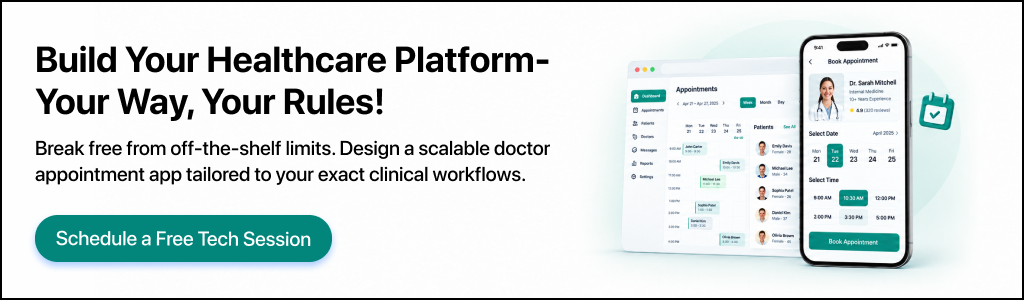
Usually, this is the common query patients have while accessing a health care application: Am I able to discover the proper physician and schedule appointments?
Some of the doctor appointment app features for patients are doctor location, doctor consultation, doctor appointment, payment, and feedback.
These features are used in a sequence; thus, build order is important. This is just a guideline list to use when considering features for a doctor appointment booking app.
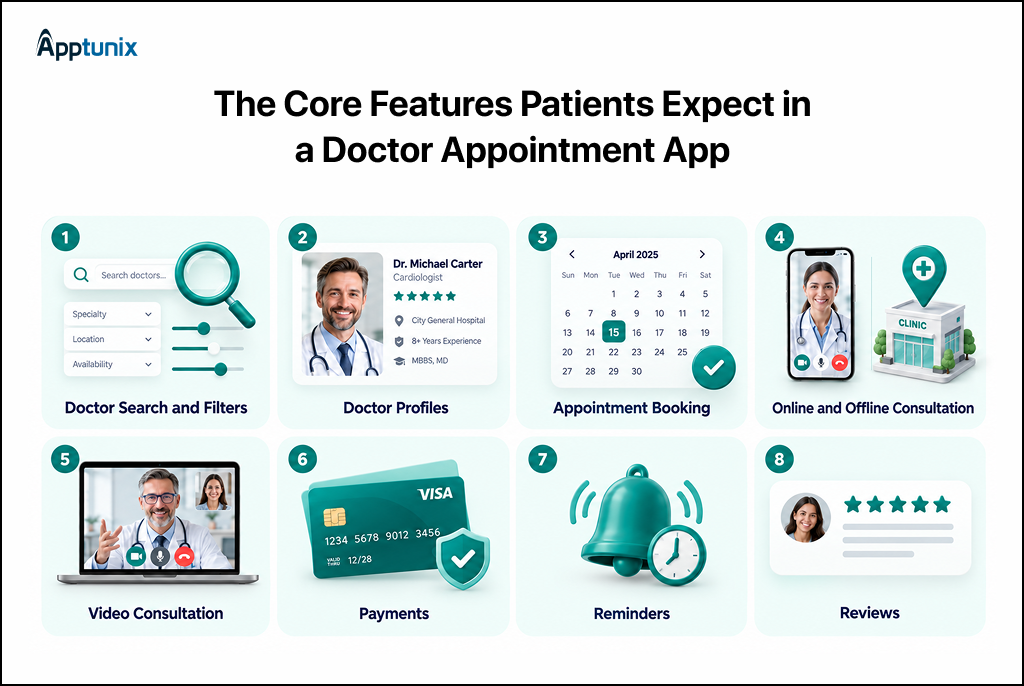
Filters include specialization, location, language, cost, and availability to narrow down search results. In terms of finding a match within the app, accurate filters can be helpful in reducing the time.
For example, on the site Zocdoc, patients can search for a particular specialty or concern, and then filter by location, insurance, and other factors. In the case of an existing app, the value of improving search may well outweigh the number of doctors added to the directory.
There are a few questions that patients typically ask before making a booking appointment that a doctor profile should address. All the qualifications, experience, language, fees, and ratings are displayed on one profile. Patients make faster decisions when the profile is able to address the trust questions first.
This is the base of any appointment doctor App. Patients will have to see the availability and pick a convenient time, confirm the time, and receive confirmation immediately.
You could also include rescheduling and cancellation as an option. These little things can save a lot of work for the clinic staff.
For some patients, visiting a clinic would be a favourable choice; for others, care from home would be preferable. Offer patients the choice of booking an in-person visit or virtual visit when they check out. That’s where an on-demand medical facility is applicable: same-day appointments and virtual visits.
Video consultation is a valuable asset for telehealth platforms. It forms an integral component of the care experience. Patients should be able to start a secure consultation on the app without having to go through a lengthy third-party tool.
As an example, Doxy.me service combines video appointments, waiting rooms, appointment management, secure sharing of files, payments, and more.
For US launches, the video layer must support HIPAA requirements, so avoid generic call links.
You should have secure payments in your app and make it clear on the screen before you confirm the payment that there will be consultation fees. Payment workflows are also required in insurance applications, depending on the market.
Payment support can cover a number of elements such as cards, electronic wallets, insurance coverage checks, refunds, and also invoices for global platforms. The exact setup will vary based on where you are located and your healthcare business model.
The goal of the reminder is to make sure that any scheduling mistake doesn’t become an unintended missed appointment. Reminders are sent to the patient via push, SMS, or email to remind them about the appointment, changes to appointments and follow-up. Reduction in missed visits, thus creating fewer empty doctor’s time slots.
Patient ratings and reviews enable patients to post comments following a visit. Think about giving feedback after completed appointments and giving providers a chance to respond. Zocdoc uses verified patient reviews and provider profiles and availability to help patients compare doctors.
Patients now have a smoother route to care. However, the product may still be unsuccessful if the doctors have a bad experience with using it.
Doctor-side features provide doctors with control over their calendar, their patients’ history, and follow-up treatment. The following are the major attributes of the doctor appointment app that determine whether doctors continue using it or not.
Patients may love a smooth booking flow. But if a doctor finds the app clumsy, they quietly stop opening it.
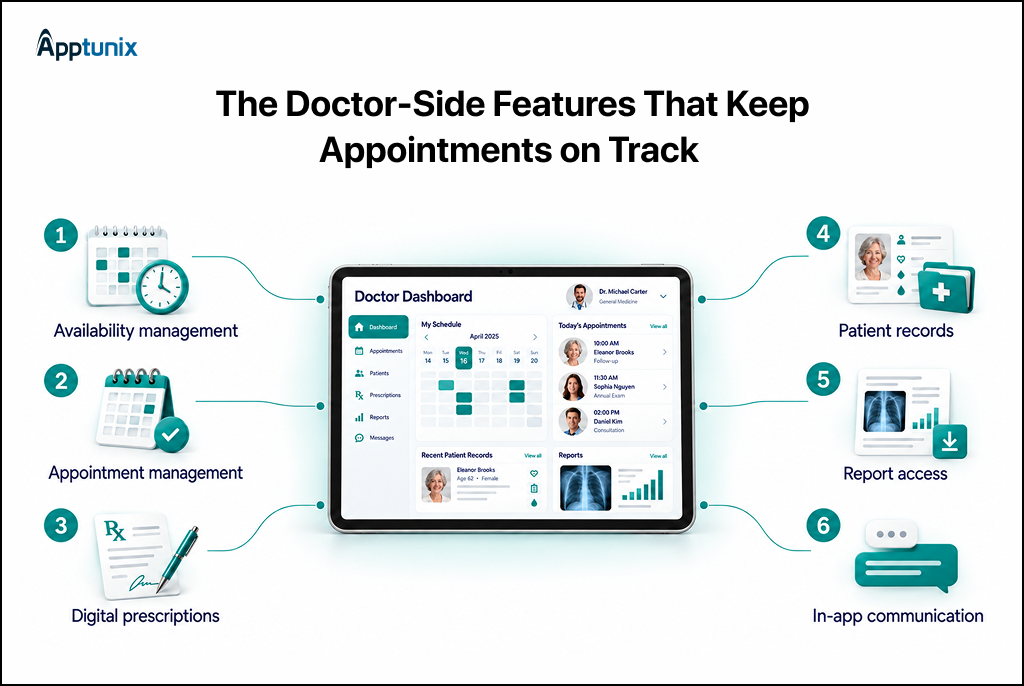
Times, breaks, leave days, and length of slots are to be determined by the doctor. It wouldn’t be wise to schedule a 10-minute follow-up in the same slot as a 45-minute initial consultation. If not, there’s a chance that a personal appointment can clash with a patient appointment, and one person has to apologize.
Here, the doctor sees their everyday list briefly. One tap accepts, reschedules, or cancels a visit. Keep this view personal. A doctor needs their own day, while the admin needs the whole clinic.
Prescriptions are written on the app, and patients receive the prescription on their phones. No writing to decipher, no paper to lose. What needs to be added to the list of checks for US launches: Electronic prescribing of controlled substances is governed by stricter DEA rules. Make sure that the confirmation is before design, not after.
Before visiting a doctor, they will want to know the patient’s history, visits, allergies, diagnostic results, and medications that are being taken. When you can prove that on one screen, that means you don’t have to say, “So what did we do last time?” Take advantage of role-based permissions and audit logs. Not every staff member should open every record.
Reports are a necessity for doctors to access prior to making clinical decisions. The application can give restricted access to laboratory reports, imaging materials, uploads, and other pertinent patient data. The doctor then opens them beside the booking, and no one looks for a file in the middle of a consultation.
There are some follow-up questions that do not warrant a new appointment. Secure chat handles “should I keep taking this?” in two lines. Set limits, though. Do not have a policy to return messages; have office hours/auto-replies instead, otherwise doctors will answer at 10 pm.
The patient journey is only one side of the product. The control room, which is behind it, is responsible for the smooth running of the whole operation.
The administrative panel is the central operational engine for healthcare networks and multi-clinic platforms.
This is the side your business actually runs on. It is never seen by patients and only indirectly felt by doctors. But it determines how safe you are when bringing doctors on board, how clean your money is, and how quickly you spot issues. When building, this is a fundamental product.
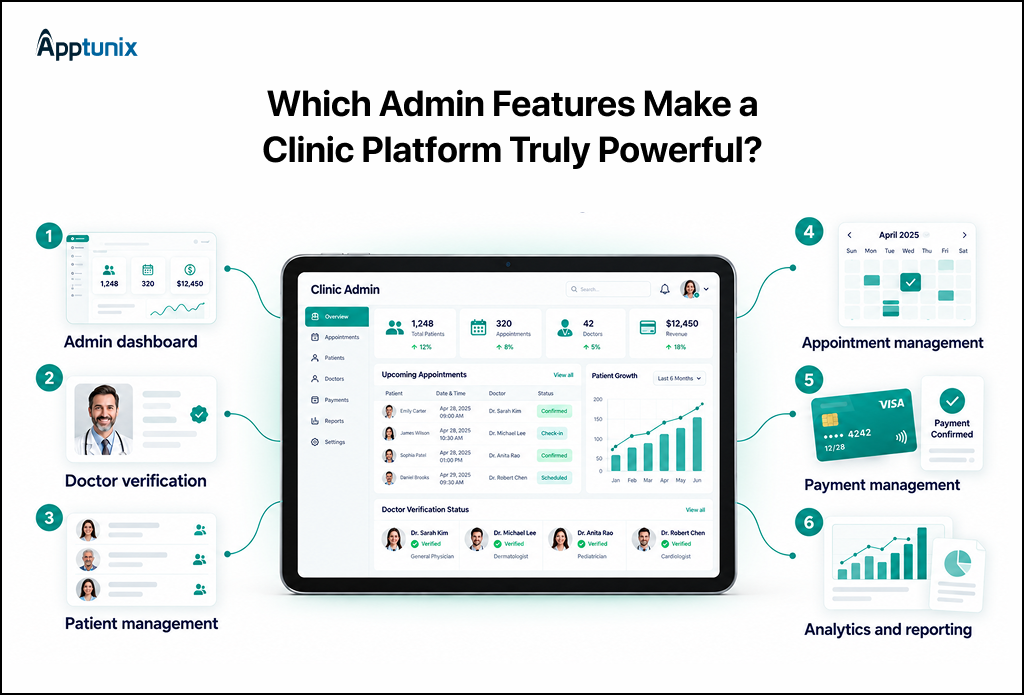
One screen should display the status of the platform as it is today. Consider bookings, active doctors, pending approvals, failed payments. The dashboard should be reworked if an operator has to click three times to see the bookings for today.
Anyone can claim to be a doctor. Your admin team cannot take that on trust. Add a review step that checks the medical license and specialty. Also see the NPI number for US providers. Get a license from the health authority in the UAE, like DHA Dubai. Complete this before any profile goes live. One unverified profile is a patient-safety problem and a legal one.
Admins must be able to manage accounts, complaints, bookings, support requests, and suspicious activity. They rarely need to read health records. HIPAA’s minimum necessary rule limits access to what each role needs. Give support staff contact and booking details only. Audit logs then record who opened what.
Doctors manage their own day. Admins see the whole clinic. That view helps when a doctor calls in sick, and three bookings need a new home. It also shows the Tuesday when four doctors sit idle.
Money needs the most care here. Mainly around tracking payments, refunds, and doctor payouts. If you have a marketplace, keep an eye out on your commission. Settle the commission model early on. Changing it after launch means rebuilding the payout logic.
Reports turn transit activities into decisions. Watch no-show rates, peak booking hours, top specialties, and revenue per doctor. Stay selective, though. A dashboard with forty charts gets ignored. Select specific numbers your team will review each week.
If you’re looking to work with a development partner, here’s one helpful hint. Must request the admin panel demo prior to anything else.
Now you know who uses the platform and who controls it. Next comes: which advanced features justify the extra budget?
Begin with EHR/EMR integration and insurance verification, then introduce AI features once your booking data is clean.
These advanced services of a doctor appointment application are riskier and costlier than the basic services. Some pay back fast. Some people sound fantastic when they demo, but then they don’t play.
So judge each one by the problem it solves for your clinic. Here’s an honest look at all six.
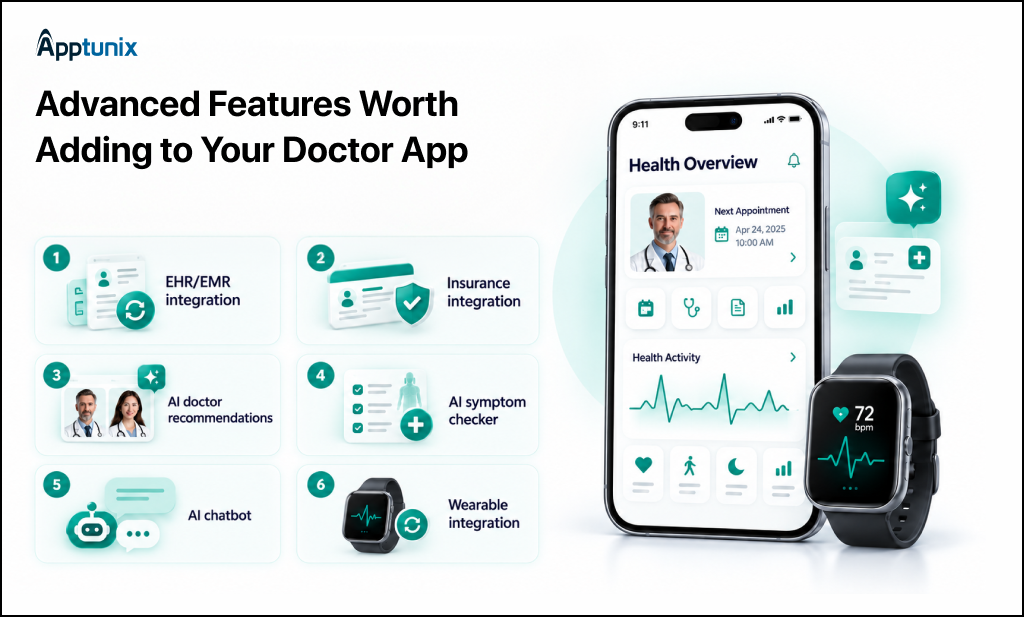
This connects the app with the records that your physicians utilize. Data exchange is supported by systems such as Epic and Oracle Health; HL7 FHIR is built into the systems. The trick is when. The approval process is done by each health system, so your health system schedule is not necessarily the same as your developers’.
Real-time eligibility checks display a plan’s coverage prior to the visit. These are executed on standard X12 transactions on a clearinghouse in the US. This is a quick one to pay off because surprise bills result in cancellations and complaints. Don’t bother with cash-only practices.
The application matches patients with doctors based on the specialty, symptoms, and availability. Be careful, though, for there is a bias. If only the highest-rated doctors are offered the best appointments, then new doctors will never be booked. Inform the patients of the reasons for all doctors being recommended.
The checker asks a few questions, then directs patients to the appropriate specialist/urgency. Under FDA regulations, software that makes diagnosis recommendations might be considered a medical device. Keep it to routing, and get legal review first.
A chatbot responds to queries about booking and rescheduling at any time of the day. Two rules apply. Don’t ask it to give medical advice. And, once it comes in contact with patient information, any third-party AI service provider must have a signed HIPAA business associate agreement.
Apple HealthKit and Android’s Health Connect can feed heart rate or glucose data into patient records. That suits chronic-care models. It’s an expensive and storage-intensive addition that isn’t worth it for typical booking software.
If your budget stretches to only two, pick EHR integration and insurance checks. The rest can wait for real user demand.
Features are only half the roadmap. The market is moving too, so here is where booking apps are heading in 2027.
AI, interoperability, intelligent scheduling, and patient-centric access will be the key features of the doctor appointment app trends. By 2026, this shift is already happening, with intelligent patient navigation, interoperability, real-time scheduling, and automation replacing the old online booking system.
That’s an important change that will affect businesses that are looking to launch a new doctor appointment app or improve current apps.
Which trends should be considered for your roadmap in 2027, then?
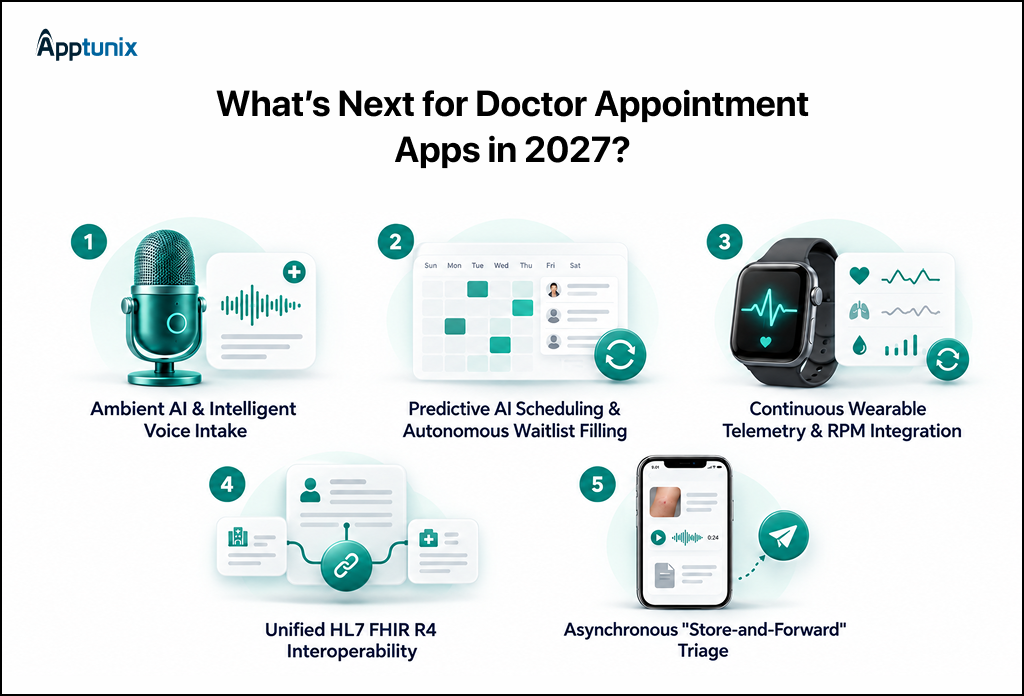
1. Ambient AI & Intelligent Voice IntakeAn appointment’s first step can be a lot easier with voice intake. Instead of filling out lengthy forms, patients can tell the staff about their reason for booking. The system can be able to gather pertinent information, and structured details can be delivered to the care team. The selection of voice scheduling for the booking, rescheduling, and routing of routine requests is also emerging.
2. Predictive AI Scheduling & Autonomous Waitlist FillingThe empty slots in a calendar are a practice margin killer. Predictive algorithms are used to analyze historical attendance patterns and detect high-risk no-shows. The system will automatically send texts to the patients on the waitlist to fill the slot within a few minutes as soon as the cancellation occurs.
3. Continuous Wearable Telemetry & RPM IntegrationData from the wearable device is streamed into the chart before a visit for apps to retrieve. This fits in with chronic care. A standard booking application is of little value, but it is costly to store, manage consent flows, and offer support. If patients require continuous monitoring, build it; otherwise, don’t.
4. Unified HL7 FHIR R4 InteroperabilityWith FHIR R4, your app can send and receive records with EHRs via standard APIs. The CMS initiative committed Apple, Samsung, and Google to FHIR-based record sharing. There is still an approval process that each health system conducts in its own way and may cause delays that are beyond your developers’ control.
5. Asynchronous “Store-and-Forward” TriagePatients send photos, symptoms, and history, and doctors reply within hours, without a live call. Skin concerns and routine follow-ups fit well. Urgent symptoms don’t, so add red-flag escalation.
Apptunix creates doctor appointment applications, patient portals, clinical messaging, and clinical reference platforms. Its clients include hospital groups through to healthcare startups. Healthcare projects are featured in the Apptunix portfolio, ranging from patient bookings to EMR integration.
To select a doctor appointment app development company, you need to ensure they share the same range of services, security protocols, and results. Apptunix is ISO 27001 certified, a security certification that is important when apps deal with patient information. Browse every healthcare project in the Apptunix healthcare portfolio. The information for each entry is shown for what was built and the results the client reported.
So, what does a good doctor appointment app actually need? Quite a lot, but not everything at once.
We started with the essentials. The app integrates doctors, patients, and admin in a single booking flow. Patients require search, profiles, real-time booking, payments, reminders, and reviews. For the doctors, there should be control over their Calendar, Records, and Prescriptions. Admins require verification, tracking of payments, and easy reporting.
Then came the harder choices. AI assistants, FHIR links, and wearable data can pay off, but only when they fix a real bottleneck. Truth is, that’s the filter that matters. If a feature can’t name its problem, it can wait.
Looking to update an older app? Start where patients quit. Fix that step first, then connect your systems, then add AI.
The 2027 trends point the same way: voice intake, smarter waitlists, and connected records. Before signing up with a healthcare app development company, look into their scope, security, and results before signing up.
One last thing. Patients judge your clinic by how easy booking feels. That’s why doctor appointment app development is worth giving some thought to, and not copying a checklist. Do the base, record the results, and then complete the rest. Once you get the core right, the app deserves to be a patient’s phone.
Q 1.How do you build a doctor appointment app?
First, identify the target audience, healthcare workflow, business model, and market requirements for the project. Next, trace the patient and healthcare provider paths. Develop the framework booking experience, build both the patient and doctor screens, and incorporate necessary healthcare and payment systems. Remember to check security and usability, and roll out with built-in analytics.
Q 2.How much does doctor appointment app development cost?
Doctor appointment app development typically costs $10,000 to $30,000+ for basic to standard solutions, depending on complexity. The final cost depends on user roles, platforms, integrations, security requirements, consultation features, and advanced functionality. A simple booking app sits near the lower end, while features such as EHR/EMR integration, video consultation, insurance workflows, AI, and remote monitoring can push the cost higher.
Q 3.How long does it take to develop a doctor appointment app?
Doctor appointment app development can take 2–3 months for a basic app, 3–6 months for a standard solution, and 6–9+ months for an enterprise platform. The timeline depends on the number of roles, platforms, integrations, compliance requirements, and advanced features. A basic booking flow can launch faster, while EHR/EMR integration, telemedicine, AI, and complex healthcare workflows require more development and testing time.
Q 4.Is a doctor appointment app HIPAA compliant by default?
No. A simple app that’s a healthcare product doesn’t automatically qualify for HIPAA compliance. The design of the architecture, data handling, access rights, audit mechanisms, vendor relationships, and operational processes should all be designed to comply with applicable requirements.
Q 5.What is the difference between a doctor appointment app and a clinic management system?
The general objective of a doctor appointment app is basically to help patients gain access to and arrange doctor visits, but a modern app can do so much more. A clinic management system caters to the broader aspects of the clinic’s operation, including patient management, appointments, clinic logs, billing, staff scheduling, reports, and more.
Get the weekly updates on the newest brand stories, business models and technology right in your inbox.
Arohi Singh is a technology content strategist at Apptunix, where she writes about software and app development across industries, from on-demand and logistics to fintech, healthcare, and applied AI. With over 5 years of experience, she works closely with Apptunix’s engineers, product managers, and solution architects to turn real project insights into clear, decision-ready guidance for founders and business leaders. Her writing focuses on what matters before you build: market context, feature trade-offs, realistic costs, and compliance considerations
9 Views 11 min October 8, 2026

65 Views 11 min September 8, 2026

76 Views 11 min August 27, 2026
Book your consultation with us.
Book your consultation with us.


One Central, The offices 3, Level 3, DWTC, Sheikh Zayed Road, Dubai
+971 50 782 1690