
Embedded Software Development: A Complete Guide for Entrepreneurs
31 Views 11 min April 22, 2026

Pallavi Nautiyal is a seasoned Tech Consultant at Apptunix, specializing in the intersection of global finance and decentralized technology. With a deep-rooted expertise in banking infrastructure, digital payment gateways, and Web3 ecosystems, she guides businesses through the complexities of modern financial engineering. Pallavi is recognized for her ability to architect secure, compliant, and scalable solutions—ranging from smart contracts and crypto-wallets to robust digital banking platforms. Her strategic insights help organizations navigate regulatory landscapes while leveraging the power of Blockchain to ensure transparency and seamless user experiences in every transaction.

At 8:45 a.m., the finance lead at a fast-growing startup noticed something odd.
Revenue looked healthy. Customers were signing up. Payments were arriving. But the numbers didn’t match.
Invoices said one thing. The accounting dashboard said another. Payment reports told a third story. Nothing was technically broken. But the system behind it was.
What began as a few spreadsheets and manual invoices had slowly turned into a fragile setup holding the company’s cash flow together. Every new pricing plan made billing harder. Every new customer added complexity.
This is why more companies are investing in billing software development today, process includes:
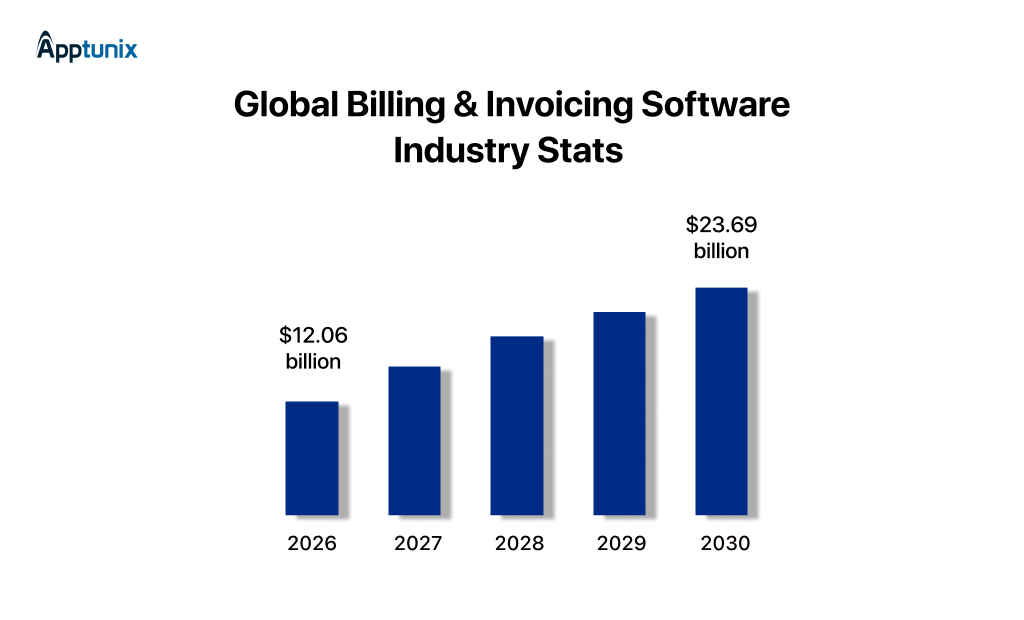
The market itself tells the story. The global billing and invoicing software industry is expected to grow from $12.06 billion in 2026 to $23.69 billion by 2035. Businesses are realizing that billing isn’t just a finance tool anymore. It’s infrastructure.
The right billing software for businesses can support new pricing models. It can automate revenue operations and remove friction from how money flows through the company.
This guide breaks down how modern companies actually build billing systems that can scale. Let’s start with why your business needs billing software.
The three biggest advantages of using billing software for businesses are simple but powerful. It improves cash flow, saves hours through automation, and most of all, it strengthens financial security. Let’s take a closer look at why these benefits matter.
One of the biggest reasons you need billing software is speed. Automated invoicing, structured reminders, and real-time tracking shrink the gap between service delivery and payment collection. Cash flow problems rarely start with sales. They start with process friction.
Subscription-based platforms such as Shopify rely heavily on automated billing logic because manual oversight doesn’t work at scale. Once transaction volume increases, manual systems collapse under complexity.
A good billing software reduces cognitive load for leadership. When billing runs in the background reliably, founders can focus on expansion.
The moment your company handles financial data, you become a target. Payment details, transaction records, and customer billing information are sensitive assets. Another core reason you need billing software is structured security.
Security investment may not directly drive revenue. But it protects margin, reputation, and enterprise deals.
Once the need is clear, the next step is understanding how billing software is actually built.
In just seven steps, you can complete the billing software development process that actually fits your business. Start simple. Launch fast. Then scale it with the right strategies as your company grows. Let’s start step-by-step.
Step 1: Requirement AnalysisThis stage shapes the entire custom billing software development process. If requirements are vague, the system becomes rigid. If they’re precise, the platform becomes scalable.
Start with three critical questions:
Each user group expects speed and clarity. The design decisions for your billing software for businesses must reflect these workflows.
Your invoice software development roadmap should reflect industry realities. Otherwise, you end up customizing endlessly later.
Many companies shift models as they scale. A flexible billing system development framework allows pricing evolution without rebuilding the entire platform.
Step 2: Tech Stack for DevelopmentThe technology behind your billing engine determines reliability and speed. Billing systems sit close to revenue. If the architecture fails, cash flow gets interrupted.
A strong stack typically includes:
| Billing Software Tech Layer | Technology |
|---|---|
| Frontend | React, Vue, Angular |
| Backend | Node.js, Python, Java, .NET |
| Database | PostgreSQL, MySQL, MongoDB |
| Cloud & DevOps | AWS, Microsoft Azure, Google Cloud |
| Payment Integrations | Stripe, PayPal |
Step 3: UI/UX DesignBilling software lives inside daily operations. If it feels slow or confusing, teams avoid using it correctly. Great billing and invoicing software focuses on speed. Three UI/UX design priorities stand out.
| UI/UX Design Priorities | Details |
|---|---|
| Fast Invoice Creation | Finance teams should be able to generate invoices in seconds. |
| Clean Dashboard | Executives and finance managers need instant visibility. Good design turns billing software into a decision tool. |
| Mobile Responsiveness | Businesses no longer operate only from desktops. Modern billing software for businesses must work smoothly across devices. |
Step 4: Billing Software MVP DevelopmentOne of the biggest mistakes in custom billing software development is overbuilding the first version. You don’t need a full financial platform on day one. The smartest teams launch a focused MVP. Core MVP development solutions should usually include:
This minimal product already replaces spreadsheets and manual tracking. More importantly, it allows companies to validate how teams actually use the system before expanding functionality.
Step 5: IntegrationsAPI integrations are one of the important steps of billing software development. Strong integrations make the system exponentially more valuable.
Key integrations often include:
Sync invoices directly with accounting platforms to eliminate duplicate data entry. This keeps financial reporting accurate and up-to-date.
Connecting CRM software data helps sales teams track payment behavior alongside customer relationships. It also improves forecasting accuracy.
For larger organizations, ERP integration ensures billing data flows into inventory, supply chain, and procurement systems.
Payment gateway integrations allow customers to pay instantly through cards, digital wallets, or bank transfers.
The easier it is to pay, the faster revenue arrives.
Step 6: Software TestingBilling systems cannot afford errors. A single miscalculated invoice can damage customer trust and create accounting complications. Testing in the billing system development must be rigorous. Three testing layers are essential.
| Testing layers | Details |
|---|---|
| Security Testing | Penetration testing, encryption validation, and access control audits protect sensitive information. |
| Performance Testing | Billing cycles often generate traffic spikes. Performance testing ensures the system handles peak loads smoothly. |
| Tax Compliance Validation | Different regions apply different tax rules. Your billing and invoicing software must calculate taxes accurately across jurisdictions. |
Step 7: Software Deployment & ScalingOnce the system is stable, deployment begins. But successful companies treat deployment as the start of growth, not the finish line.
Early deployment typically focuses on:
From there, the platform evolves. As companies scale, billing software development expands to include:

Now let’s look at the core features every modern billing system should include.
Your billing software shouldn’t just send invoices. It should support how your business grows. Here are the key features your billing system needs to scale with you.
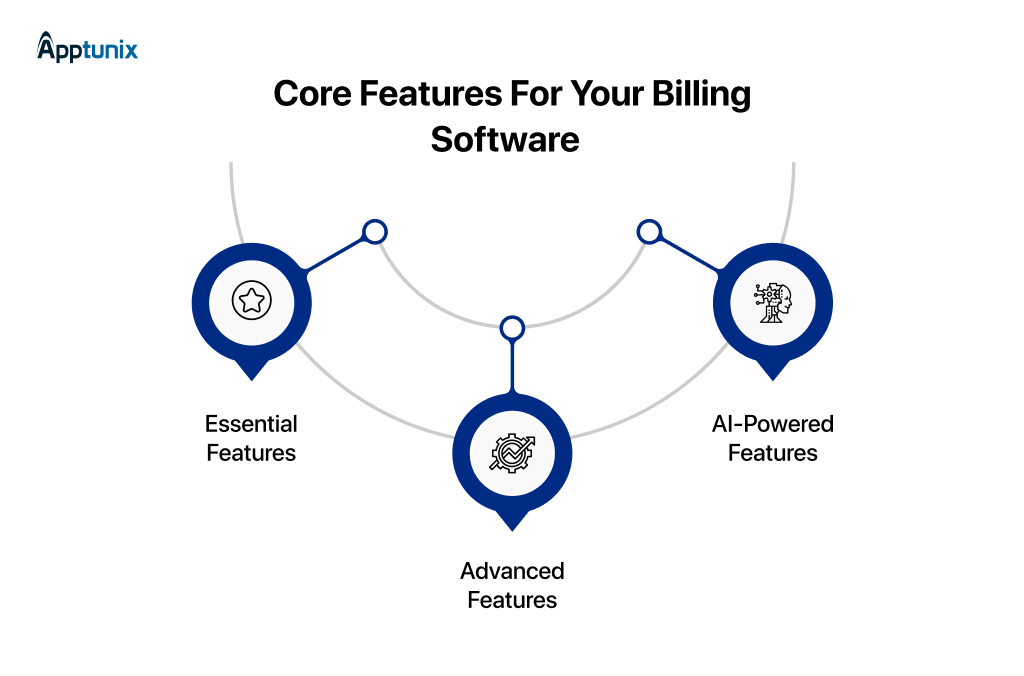
If these billing software features are weak, everything downstream gets expensive.
Your invoice system should generate invoices in seconds, support customizable templates, handle taxes automatically, and reflect branding consistently. If your finance team edits PDFs manually, you’re scaling inefficiency.
Your system should centralize customer profiles, billing history, payment behavior, credit notes, and subscription status. When customer data is fragmented across tools, collections become reactive. Support teams’ guess. Finance reconciles manually.
If your offerings are evolving, your billing logic must evolve with them. Without a flexible product catalogue, every pricing change becomes an engineering task. That slows experimentation.
If you plan to scale globally, this isn’t advanced. It’s mandatory. Multi-currency support allows localized pricing, real-time exchange rate handling, and accurate financial reporting. Without it, international expansion becomes a source of operational friction.
Once your fundamentals are strong, billing becomes a strategic advantage.
Subscription models are unforgiving. Miss one renewal cycle and you leak revenue. Recurring billing automation should handle subscription, proration, plan upgrades, trial conversions, and dunning workflows.
Your billing system must talk directly to payment processors. Each integration adds development effort. But skipping it increases manual reconciliation and error risk. For scale-stage companies, seamless payment flow improves customer trust and reduces abandonment.
Regulations are tightening globally. Governments are digitizing tax enforcement. E-invoicing compliance ensures legal invoice formatting, tax reporting alignment, and audit readiness. Ignoring this feature may save money upfront. It will cost significantly more during audits or expansion.
This is where billing shifts from reactive to predictive.
Predictive billing intelligence reduces uncertainty. With AI insights, you can forecast late payments, adjust credit limits, optimize reminder timing.
As transaction volume increases, risk increases. AI-powered fraud detection Flags suspicious transactions, identifies abnormal patterns, and reduces chargebacks. This protects the margin directly.
The features you choose will directly influence the overall custom software development cost.
The cost to build billing software ranges from USD $20,000 to $300,000+, depending on the complexity and functionality of the software. Here’s a category breakdown of billing software development costs.
| App Complexity | Cost in USD | Functionalities |
|---|---|---|
| MVP Billing Software Development | $20,000-$50,000 |
|
| Moderate Billing Software Development | $50,000-$100,000 |
|
| Enterprise Billing Software Development | $100,000-$200,000+ |
|
Various factors impact the billing software development process; here they are:
Billing software can be simple. Or it can become your financial control centre. Advanced features of billing software increase development costs upfront. They reduce operational costs and revenue leakage in the long term.
Billing software rarely operates alone. It must connect with CRMs, ERP systems, payment gateways, accounting software, tax engines, and analytics tools. Each integration adds engineering time. APIs break. Documentation changes. Rate limits exist.
If your interface feels confusing, slow, or outdated, customers hesitate. Internal teams struggle. Errors increase. Clean dashboards. Intuitive reporting. Clear invoice flows. These aren’t “design extras”. They directly impact financial operations.
Billing software handles financial data. That means security is existential. Compliance increases development time. It also increases credibility. Skipping security reduces short-term cost. It increases long-term risk exponentially.
Billing systems cannot go down. Downtime during invoicing cycles or subscription renewals directly hits revenue. Choosing cloud infrastructure affects scalability, reliability, performance, and ongoing operational cost.
A development team in North America will cost more than a team in India or Eastern Europe. But cost per hour isn’t the only metric. A cheaper team without domain knowledge increases rework. Rework increases the cost more than hourly rates ever will.
| Development Location | Cost in USD | Details |
|---|---|---|
| India/South Asia | $20 – $90 per hour |
|
| North America | $80 – $180 per hour |
|
| Western Europe | $60 – $130 per hour |
|
In this section, we’ll explore the different types of billing systems and help you identify which one fits your business best.
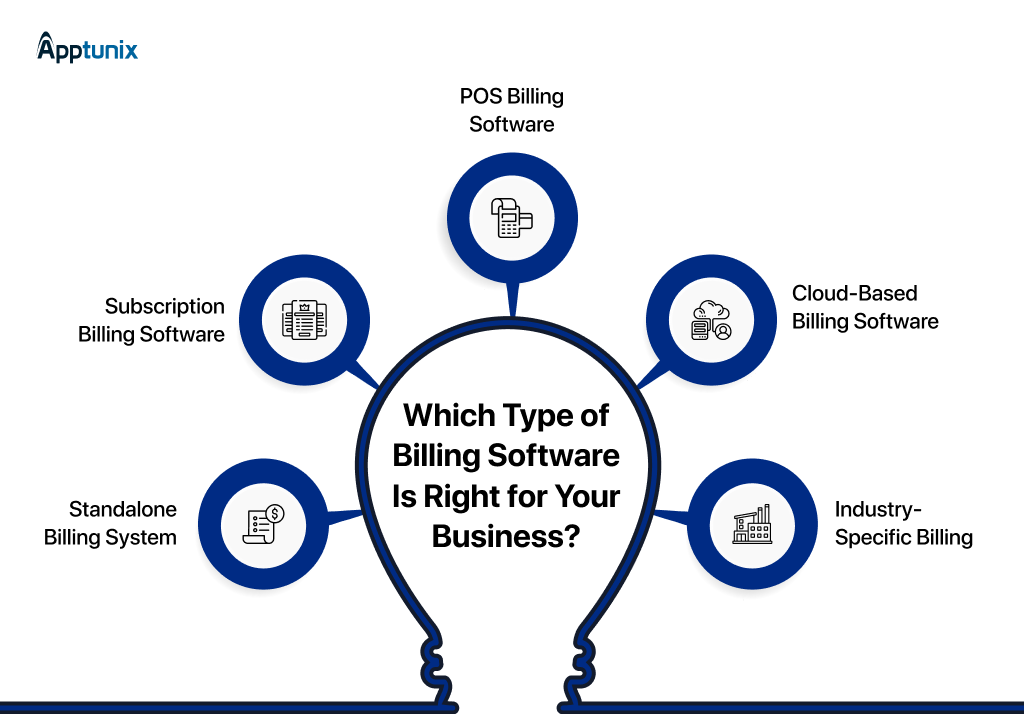
At its core, a standalone billing system handles basic invoice generation, payment tracking, and tax calculation. It’s simple, functional, and affordable. And for early-stage businesses, that’s enough.
But here’s the strategic trade-off: A basic system optimizes for record-keeping, not revenue design.
This is where billing shifts from accounting support to growth infrastructure. Subscription billing isn’t about recurring invoices. It’s about owning the lifecycle of predictable revenue.
A robust system enables recurring billing automation, proration logic, usage-based pricing, and plan changes without revenue leakage.
POS billing is often misunderstood as a retail tool. In reality, it’s a real-time revenue and inventory intelligence system.
This software will help you to handle the barcode billing, inventory sync, and Instant receipts. The major thing is that it connects:
For multi-location or omnichannel businesses, POS-driven billing software development becomes a margin optimization move.
Cloud billing isn’t a deployment choice. It’s an organizational design decision. When your billing system is cloud-native:
This directly impacts faster financial closes, global expansion readiness, remote finance team efficiency, and audit & compliance speed.
More importantly, cloud architecture allows your billing and invoicing software to integrate into the rest of your stack: CRM, ERP, analytics, payment gateways, & tax engines.
This is where generic tools fail, and custom scalable billing software creates category leaders. Because some industries don’t just have different pricing. They have different revenue logic.
In these sectors, billing software development is not an IT project. It’s a core business system.
Not every business needs to build billing software. But for some, it becomes a smart move as they scale.
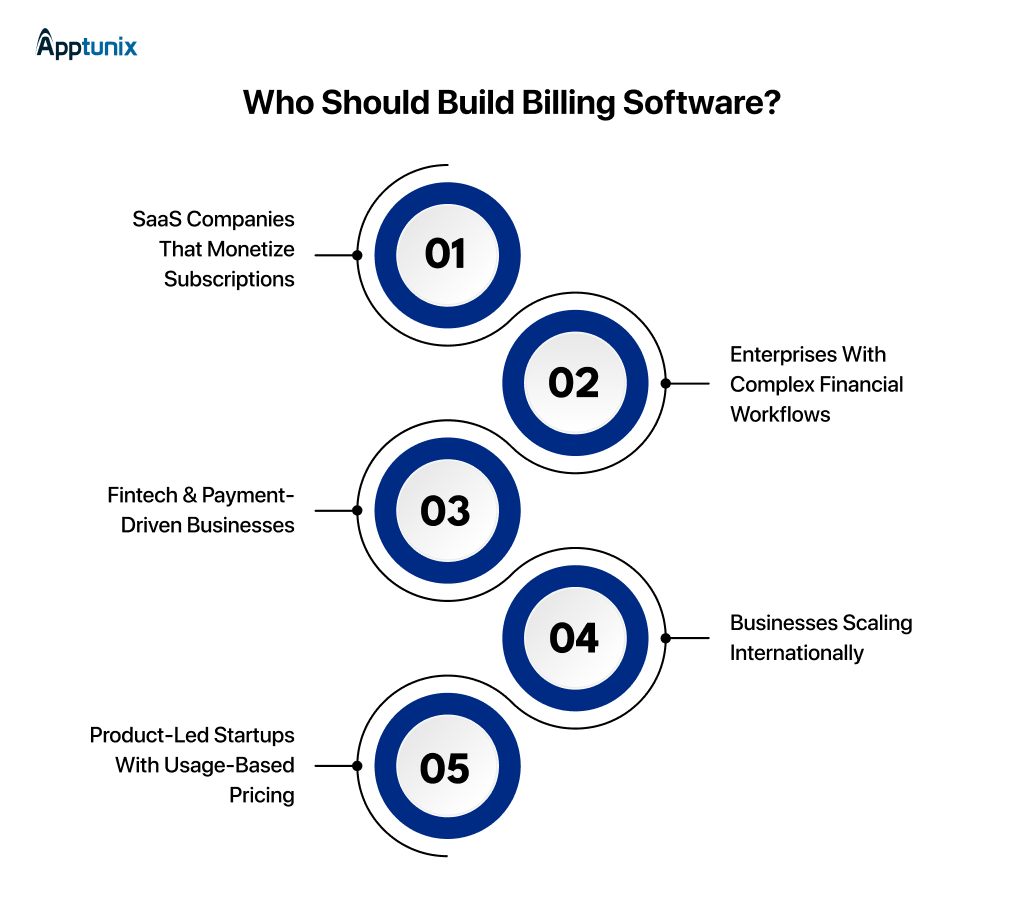
If you’re running a subscription SaaS business, billing isn’t back-office. It’s the revenue engine. Here’s where custom billing makes strategic sense:
The ROI calculation isn’t about engineering cost. It’s about pricing agility. In high-growth SaaS, billing flexibility directly correlates with revenue expansion.
Enterprise finance is rarely simple. For large enterprises, building billing software is often about control.
This isn’t a feature decision. It’s an operational risk decision. In this segment, custom billing is less about innovation and more about stability, governance, and long-term scalability.
For fintech and transaction-driven platforms, billing isn’t adjacent to the product. It’s the product. If your business model includes:
Then, off-the-shelf billing systems often create constraints. You invest heavily upfront in engineering and compliance. But you gain margin control, product differentiation, and operational defensibility.
Global expansion looks exciting on a growth dashboard. Billing complexity explodes behind the scenes. What works domestically rarely survives an international scale without serious customization.
At low volumes, third-party platforms handle most global billing requirements. But as transaction counts increase, fees accumulate and operational complexity multiplies. At scale, companies begin asking:
Building billing software becomes a margin optimization strategy.
Usage-based pricing is no longer niche. If your pricing depends on:
Then, billing needs real-time integration with product analytics systems.
This is where pre-built tools often create friction. They can invoice, yes. But can they mirror complex usage logic without custom engineering layers?
When product growth depends on transparent, accurate usage billing, internal control becomes valuable.
Billing is easy to ignore when things are small. A few invoices. A simple payment flow. But as companies grow, billing quietly becomes part of the revenue engine. Pricing models evolve. Customers expand across regions. Transactions multiply. What once worked smoothly starts creating friction.
That’s why thoughtful billing infrastructure matters. The right system doesn’t just send invoices. It supports how a company scales.
A strong billing software development company doesn’t just build software. It understands how revenue actually moves through a business. That’s the approach we take at Apptunix, providing software development services. We build billing systems that support evolving pricing models.
Why Apptunix:
If billing is starting to slow your growth, it might be time to build a system designed for where your business is going next.

Q 1.How to Develop Billing Software?
Start with the business model. Billing software must match how a company earns revenue: subscriptions, usage-based pricing, one-time invoices, or hybrid plans. Define the core workflows first: invoicing, payment processing, tax handling, and reporting.
Next, design the architecture. Most modern billing platforms are built as cloud-based SaaS systems with APIs that connect accounting tools, CRMs, and payment gateways.
Then comes development. Teams build modules like invoice generation, subscription management, payment tracking, automated reminders, and analytics dashboards.
Before launch, testing is critical. Billing systems must handle taxes, currencies, refunds, and edge cases without errors.
Finally, deploy the platform and continuously improve it based on usage data and customer feedback.
Q 2.What is the SaaS Billing Software Development Cost?
The cost of SaaS billing software usually ranges between $30,000 and $200,000+, depending on complexity. A basic platform with invoicing, payment integration, and reporting sits on the lower end.
Costs increase when you add features like subscription management, multi-currency support, automated tax calculations, analytics dashboards, and integrations with external systems. Infrastructure, security, and compliance requirements also influence the final budget.
Q 3.How Much Does it Really Cost to Develop Billing Software?
A lightweight MVP may cost around $25,000–$40,000. A full SaaS billing ecosystem with advanced automation, analytics, and integrations can exceed $200,000+. The enterprise custom billing solution can cross over $300,000.
The final cost depends on product scope, development team rates, integrations, and long-term scalability requirements.
Q 4.How Much Time is Required to Develop Billing Software?
Development timelines usually range from 3 to 9 months. A basic MVP with core invoicing and payment features may take 2-3 months.
A more advanced SaaS billing platform with subscriptions, automation, analytics, and integrations typically takes 5–9 months to implement. Time also depends on testing, compliance checks, and the complexity of the billing workflows.
Get the weekly updates on the newest brand stories, business models and technology right in your inbox.
Pallavi Nautiyal is a seasoned Tech Consultant at Apptunix, specializing in the intersection of global finance and decentralized technology. With a deep-rooted expertise in banking infrastructure, digital payment gateways, and Web3 ecosystems, she guides businesses through the complexities of modern financial engineering. Pallavi is recognized for her ability to architect secure, compliant, and scalable solutions—ranging from smart contracts and crypto-wallets to robust digital banking platforms. Her strategic insights help organizations navigate regulatory landscapes while leveraging the power of Blockchain to ensure transparency and seamless user experiences in every transaction.
Book your free consultation with us.
Book your free consultation with us.

One Central, The offices 3, Level 3, DWTC, Sheikh Zayed Road, Dubai, United Arab Emirates
+971 50 782 1690