
Compliance-Ready Software Development in Saudi Arabia: Laws, Standards and Best Practices
38 Views 12 min July 15, 2026

With over 20+ years of experience in driving global digital initiatives, Nikhil Bansal is the CEO & Director of Apptunix. He specializes in orchestrating large-scale digital transformations, enterprise-grade software solutions, and high-level business strategies that redefine industry standards. Nikhil is known for his ability to bridge the gap between complex business challenges and innovative technology, helping Fortune 500 companies and startups alike achieve sustainable growth. A visionary leader, he empowers enterprises to navigate the digital landscape with agile, ROI-focused models and future-ready business strategies.
Every enterprise reaches a moment where the question becomes impossible to dodge: do we build internal tools ourselves, or do we buy them off the shelf?
It sounds like a technical question. It isn’t. It’s a business strategy question, one that shapes your costs for the next five years, your team’s time, your data control, and how far your workflows can actually take you.
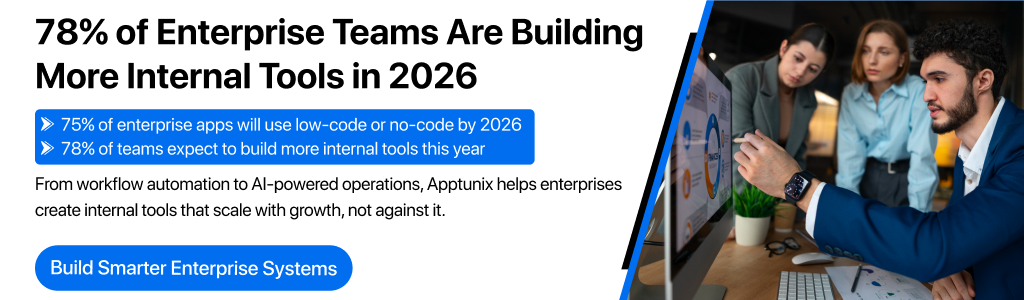
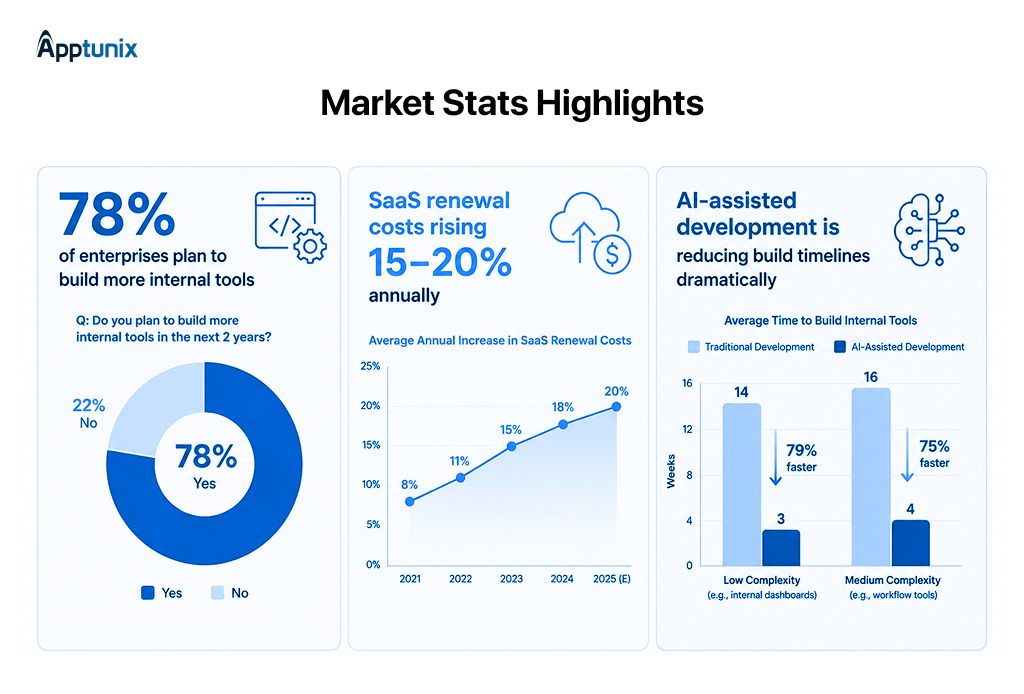
The stakes have risen. A 2026 Retool survey found that 78% of enterprise teams expect to build more of their own internal tools this year because they’ve realized that buying everything doesn’t mean owning anything.
Neither extreme is right. The real question isn’t whether to build or buy internal tools. It’s the decision that fits this tool, this team, and this moment in your company’s growth.
This guide gives CTOs, product leaders, and engineering heads a clear framework for making that call. We cover the full spectrum: what each path actually involves, the six factors that should drive your decision, when building wins, when buying makes more sense, and how AI has changed the economics on both sides.
By the end, you’ll have a decision matrix you can put to work immediately and a much cleaner view of where the real costs hide.
A few years ago, the default answer was simple: buy first, build only when you have no other option. SaaS was cheaper, faster, and “good enough.” That logic held for a long time.
It’s starting to break.
Three forces have converged to make the build vs buy software development conversation more urgent than ever:
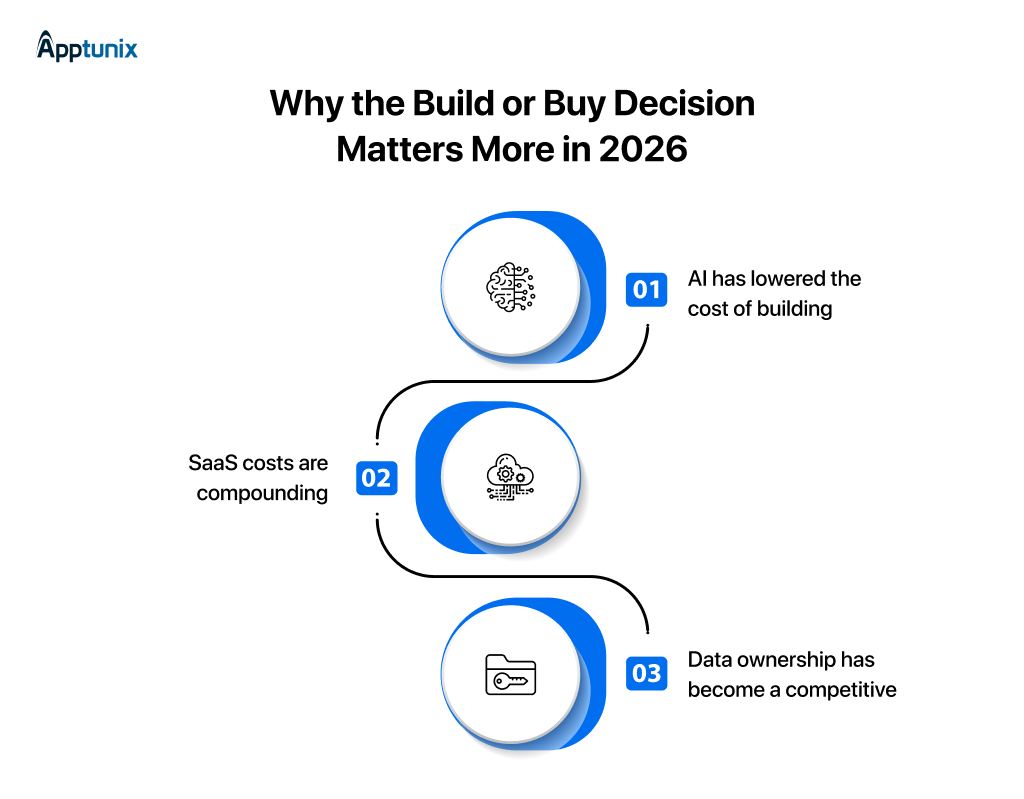
With AI-assisted development, low-code platforms, and faster prototyping cycles, custom tools that once took six months to build can now be delivered in six weeks. The effort gap between building and buying has narrowed significantly.
Subscription fatigue is real. Most enterprises pay for tools with overlapping features, fragile integrations, and renewal prices that climb 15–20% annually.
As AI becomes central to operations, the quality and control of your data matter more than ever. Off-the-shelf software often stores data in vendor-controlled environments, limiting what you can do with it.
None of this means you should build everything. It means the old defaults deserve a harder look before you apply them.
Before weighing the factors, it’s worth being precise about what each path actually involves in practice.
| ASPECT | BUILD | BUY |
|---|---|---|
| Ownership | Full ownership of codebase and data | Subscription-based; vendor owns infrastructure |
| Development | Custom software built to exact workflows | Off-the-shelf SaaS or licensed software |
| Integration | Deep integration & full control | Standard APIs; vendor hosted |
| Time to Value | Slower start; faster iteration | Faster deploy; limited customization |
| Cost | Higher upfront; variable long-term | Low upfront; costs compound |
| Competitive Edge | Strong if proprietary | Limited advantage |
| Maintenance | Your team’s responsibility | Vendor-managed |
No single variable should make this decision on its own. The following six dimensions give you a complete picture before committing either way.
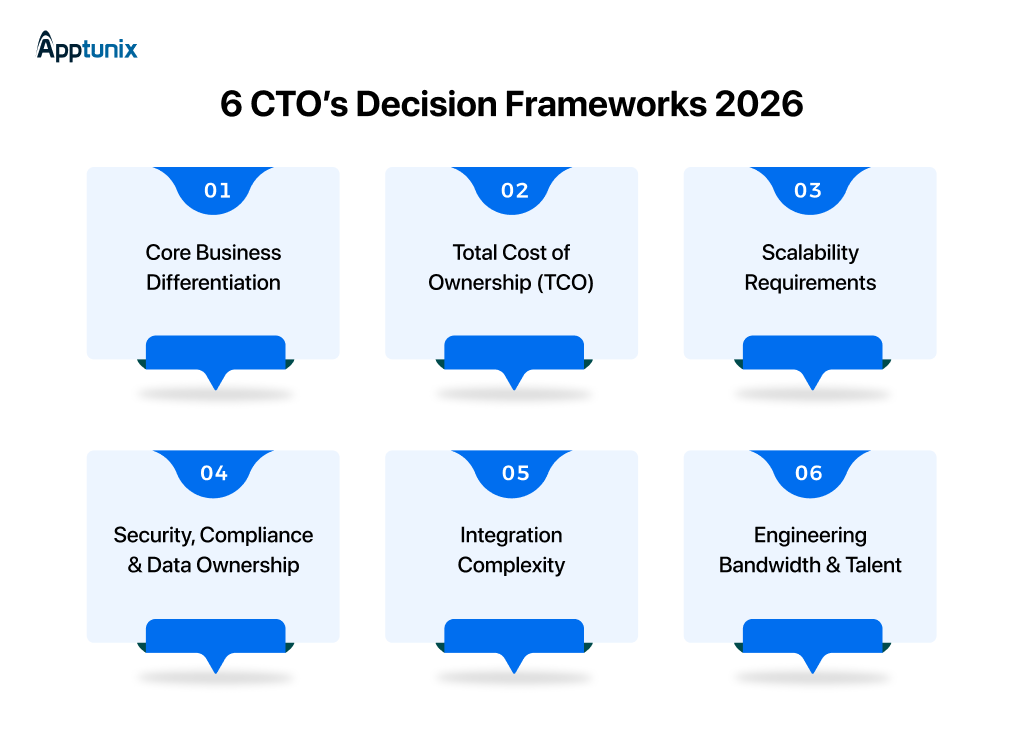
Start here. Ask whether this tool or the process it supports is something your competitors could replicate by purchasing the same software. If yes, buying is probably fine. If the process reflects how your business creates unique value, a building gives you an advantage that a SaaS vendor cannot package.
A logistics company with a proprietary routing algorithm should not run it on a generic TMS. A retailer whose only differentiator is price can safely use a commodity inventory system. The question is not whether the tool is important; it’s whether it is differentiating.
The most common mistake in the build vs. buy software decision is comparing the wrong numbers. Procurement teams compare build costs against Year 1 subscription fees. The honest comparison is 5-year TCO against 5-year TCO.
A simple benchmark: maintenance on a custom-built system typically runs 15–25% of the original build cost per year. That number belongs in the model before you decide.
Most SaaS platforms handle volume scaling well: more users, more transactions. The harder question is complexity scaling: as your workflows become more intricate, more interconnected, and more specific to your industry, does the platform grow with you or against you?
If you can describe your future needs clearly today, a SaaS platform will often handle them. If your requirements are evolving in ways you cannot fully predict, owning the codebase gives you options that a vendor’s roadmap never will.
For teams in regulated industries (fintech, healthcare, legal, and government), data residency and access controls are not optional. Many SaaS platforms offer compliance certifications, but they may not satisfy every requirement, particularly around where data is stored and who can access it at the infrastructure level.
Custom internal tools allow you to implement security at the architecture level, not just the configuration level. If your compliance obligations are complex or evolving, that flexibility has real value beyond what any vendor SLA can guarantee.
Every internal tool sits inside a broader ecosystem. The real cost of buying often shows up in integration work: connecting a new platform to existing systems, maintaining those connections as both sides update, and managing data inconsistencies across vendor boundaries.
If you are buying into a well-established ecosystem (Salesforce, SAP, Microsoft 365), integrations are usually well-supported. If your stack is unusual, or your integration requirements are complex and evolving, a custom tool built for your specific environment may actually be easier to maintain in the long run.
This is the factor that ends most built-up conversations. Building well requires product thinking, engineering skills, and ongoing maintenance capacity. If your team is fully committed to customer-facing products, pulling them onto internal tooling carries a real opportunity cost.
The question is not whether you could build; it’s whether you should spend that capacity here. Partnering with a specialist team to handle the build is a viable path that does not force you to choose between internal capacity and quality.
Building makes more sense when the tool reflects something genuinely specific to how you operate. The clearest signals that building is the right path:
Buying is the right call when the problem is already solved well by the market, and your team’s energy belongs elsewhere. The clearest signals:
Tools you should rarely build from scratch: standard payroll processing, commodity CRM for straightforward sales workflows, email and calendar infrastructure, basic project management, and video conferencing. The engineering cost of rebuilding these rarely produces returns that justify the investment.
Choosing between off-the-shelf software and custom internal software isn’t just about the upfront price. The real cost becomes clear after several years of licensing, integrations, maintenance, and scaling.
Use the framework below to estimate your total cost of ownership (TCO) over five years.
| Cost Factor | Buy Software | Build Custom Internal Tools |
|---|---|---|
| Initial Investment | Low | Medium to High |
| Annual Licensing | High Recurring Cost | No Licensing Fees |
| Customization | Limited by Vendor | Fully Customizable |
| Third-Party Integrations | Additional Cost | Built for Existing Systems |
| Scalability | Depends on Pricing Plan | Scales with Business Needs |
| Maintenance | Included in Subscription | Managed by Internal or Development Team |
| Data Ownership | Vendor Controlled | Full Business Ownership |
| Long-Term Cost | Increases with Users | More Predictable Over Time |
Buying is often the right choice if:
Building is usually the better investment if:
Many growing organizations discover that a platform that seems affordable today becomes significantly more expensive after years of subscription fees, add-ons, and user-based pricing. Evaluating five-year costs instead of first-year costs leads to a more informed build vs buy software decision.
Instead of asking whether building software is better than buying, start by asking whether the application creates a competitive advantage for your business.
Is this tool critical to your unique business process?
Yes → Continue to Step 2
No → Buying is usually the faster option.
Will your teams require frequent customization or workflow changes?
Yes → Build custom internal tools that can evolve with your business.
No → Continue to Step 3.
Will the platform integrate with multiple ERPs, CRMs, or proprietary systems?
Yes → Custom development provides greater flexibility and lower integration friction.
No → Continue to Step 4.
Will more than 100 employees use the software over the next few years?
Yes → Calculate long-term licensing costs carefully before choosing a vendor.
No → Buying may still offer the best return on investment.
If your business depends on specialized workflows, frequent automation, and seamless integrations, investing in internal tools development often delivers greater long-term value than relying on multiple disconnected SaaS platforms.
Partnering with an experienced internal tool development company also reduces technical debt while ensuring the platform grows alongside your business instead of limiting it.
These mistakes commonly occur whenever a CTO tries to make a build vs buy internal tools decision. Take a close look at them.
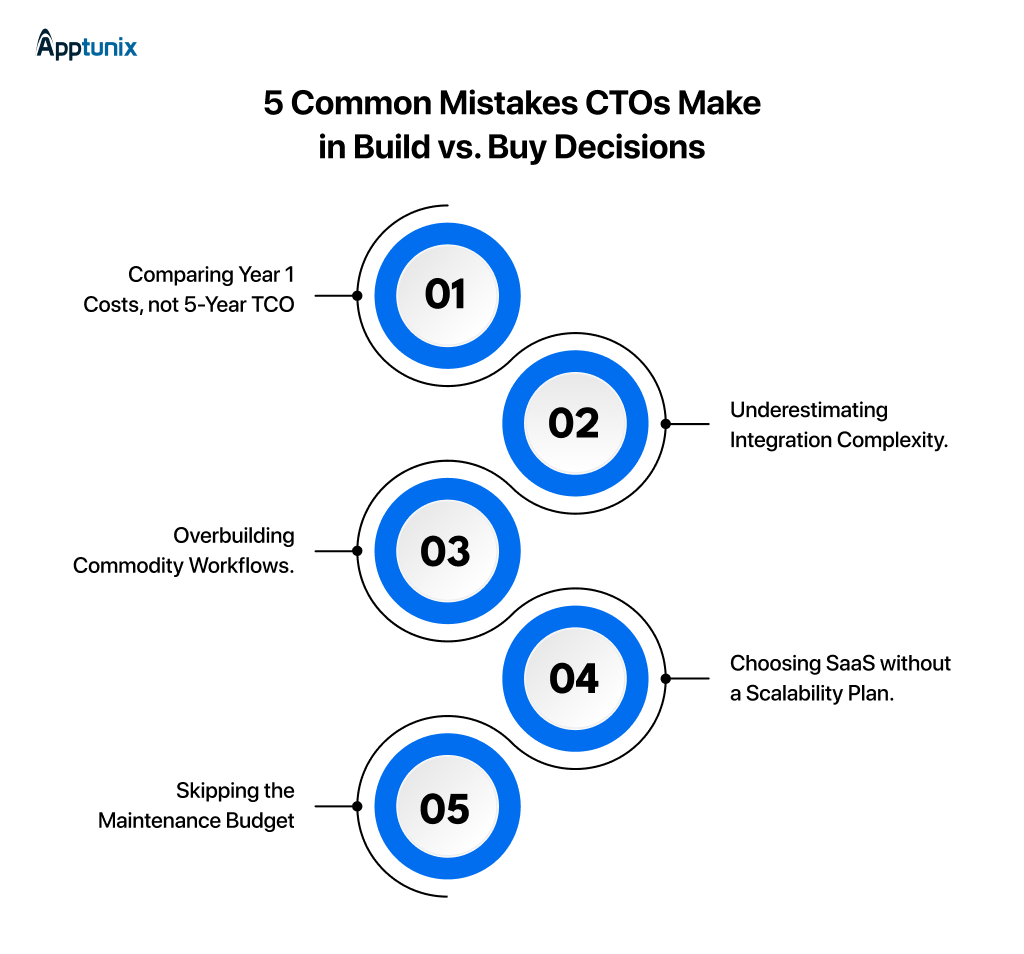
The build decision is often made by pitting software development cost against a subscription fee. Maintenance, security updates, dependency upgrades, and feature additions typically add 15–25% of the original build cost per year.
A tool that looks simple in isolation often requires 3x more work once you account for connecting it to existing systems. Audit your integration requirements before you commit to either path.
Not everything needs a custom software development solution. Approval flows, basic reporting, and standard HR processes are solved problems. Custom versions of commodity tools waste engineering capacity that belongs on differentiated work.
A platform that handles 50 users today may not handle 500 tomorrow or may charge rates that make the economics unworkable at scale. Model the 3-year trajectory before you sign.
Even well-built internal tools require ongoing care. Teams that plan for build cost but not maintenance cost find themselves with technical debt that grows faster than the business.

A mid-sized logistics enterprise was managing operations across six different SaaS products for inventory tracking, approvals, employee requests, reporting, customer updates, and document management.
While every application solved a specific problem, together they created duplicated data, inconsistent reporting, and unnecessary subscription costs.
The leadership team evaluated two options:
After a six-week discovery phase, the company chose to build a unified platform that connected ERP data, warehouse operations, finance, and customer support into a single dashboard.
The project reached operational payback within two years and eliminated recurring vendor dependency.
The biggest takeaway was simple: when software supports a company’s core operations, investing in enterprise internal tools can create lasting efficiency gains that subscription-based products often struggle to match.
Rather than adapting business processes to fit existing software, the organization built a platform that reflected how its teams already worked.
A practical reference for how each key factor typically breaks down. Use this alongside your own analysis, not as a substitute for it.
| FACTOR | BUILD | BUY |
|---|---|---|
| Speed to deploy | ⚠ Slower (weeks to months) | ✓ Faster (days to weeks) |
| Customisation | ✓ High — built to exact spec | ⚠ Limited to vendor’s feature set |
| Upfront cost | ⚠ Higher (design, build, test) | ✓ Lower (subscription or license) |
| Long-term cost | Variable; scales with complexity | ⚠ Subscription-heavy; compounds over time |
| Maintenance | ⚠ Internal team responsibility | ✓ Vendor-managed |
| Security control | ✓ Full control at architecture level | ⚠ Shared; depends on vendor’s model |
| Data ownership | ✓ Complete | ⚠ Partial data lives in vendor systems |
| Competitive advantage | ✓ Strong if tool is differentiated | ⚠ Limited—available to all customers |
| Integration fit | ✓ Built for exact stack | ⚠ Dependent on vendor’s API support |
| Scalability | ✓ Grows exactly as you design it | ⚠ Grows within vendor’s product constraints |
AI has not made the build vs buy internal tools decision simpler. It has changed the economics on both sides at the same time.
According to Gartner, 75% of new enterprise applications will be built using low-code or no-code platforms by 2026, up from less than 25% in 2020. That shift is partly AI-driven, and it has opened a third path that did not meaningfully exist before.
Building software is cheaper now. Not cheap. But cheaper enough that companies are reconsidering what they outsource to SaaS vendors.
AI coding tools, copilots, agent workflows, and automated testing have removed a lot of the slow, repetitive work from software development.
A lean product team can suddenly behave like a much larger one.
At the same time, buying software has become more attractive too.
The best SaaS companies are no longer selling static tools. They’re selling AI automation solutions, intelligence, and workflow acceleration.
That’s a major shift.
Good software is used to save time. Now it actively does work.
That raises the standard for internal tool development. Founders now compare their custom tools against AI-native platforms that improve every month and ship features at startup speed.
Low-code and no-code platforms combined with AI have created a weirdly powerful option for operators who are technical enough to understand workflows but not technical enough to write production software.
That group is growing fast.
Operations teams are building automations themselves. Marketing teams are spinning up internal dashboards. Founders are testing product ideas without touching engineering resources.
The real market shift is this: Companies are becoming more selective about what deserves custom software. AI reduced the cost of building. But it also increased expectations for software quality and speed.
So the decision framework is changing. Build when the workflow is core to your advantage. Buy when the category is evolving too quickly to be maintained internally. Use low-code when speed matters more than elegance.
Most companies will end up doing all three. That’s probably the future of software operations for the next few years.
Modern technology leaders have more choices than ever before. The right decision depends on business complexity, scalability requirements, and long-term ownership goals.
| Approach | Best For | Main Advantage | Main Limitation |
|---|---|---|---|
| Buy Software | Standard business processes | Fast deployment | Limited customization |
| Build Custom Solution | Complex enterprise operations | Complete flexibility | Higher initial investment |
| AI-Assisted Development | Intelligent automation and productivity | Faster delivery with AI support | Still requires technical oversight |
| Low-Code Platforms | Internal prototypes and simple workflows | Rapid development | Scalability and customization constraints |
Organizations that need a proven solution for accounting, HR, or collaboration often benefit from commercial software with minimal implementation effort.
Businesses with unique workflows, regulatory requirements, or multiple system integrations usually gain more value from internal business applications designed specifically for their operations.
AI is changing software delivery by accelerating development, generating code, automating testing, and improving documentation. However, AI is an accelerator rather than a replacement for architecture, security planning, and engineering expertise.
Low-code platforms are ideal for departmental dashboards, approval forms, and lightweight automation. They allow teams to move quickly but may become restrictive as complexity increases.
The question is no longer simply build or buy. The smartest organizations combine approaches:
This balanced strategy reduces operational costs while giving engineering teams the flexibility to innovate where it matters most.
The best CTOs in 2026 are not stuck on “build everything” or “buy everything.” They’re choosing carefully. What needs speed gets bought. What creates real business advantage gets built. That’s what the build vs buy internal tools decision really comes down to.
More companies are now leaning toward software development solutions because generic platforms eventually hit limits. Workflows become messy. Integrations slow teams down. Costs keep stacking up. And suddenly, software meant to simplify operations starts creating friction instead.
At Apptunix, we’ve seen how the right internal tools can completely change how teams operate. Faster execution. Better visibility. Cleaner processes. Systems that actually scale with the business instead of holding it back. The goal is never just to build software. It’s to build systems that make growth easier a year from now, not harder.
Because the smartest technology decisions are rarely about trends. They’re about creating flexibility, control, and momentum before your next stage of growth arrives.
Q 1.Should enterprises build or buy internal tools?
It depends on whether the tool reflects a differentiated process. If competitors can replicate the capability by purchasing the same software, buying is usually the right call. If the tool underpins something proprietary to how you create value, building gives you an advantage that SaaS cannot replicate. The six-factor framework above helps you determine which category your tool falls into.
Q 2.What are the main advantages of building custom internal software?
Full ownership of code and data, precise fit to your workflows, deep integration with existing systems, the ability to evolve the tool as your needs change, and competitive protection for proprietary processes. The tradeoffs are a higher upfront cost and ongoing maintenance responsibility.
Q 3.Is SaaS cheaper than custom software in the long run?
Not always. SaaS looks cheaper in Year 1 because the upfront cost is lower. Over a 5-year horizon, compounding subscription fees, per-seat charges, customization add-ons, and migration costs can exceed the total cost of a well-scoped custom build. The comparison depends on scale, usage patterns, and how specialised your requirements are.
Q 4.What is the hybrid build-buy approach for enterprise software?
Most enterprises do not make a single blanket choice. They buy commodity capabilities HR systems, standard CRM, communication tools and build differentiated ones: proprietary analytics, custom workflow engines, and AI-powered operations tools. Low-code platforms fill the middle ground. This hybrid approach gives you speed where it matters and control where it counts.
Q 5.How does AI impact the build vs. buy decision in 2026?
AI affects both sides. AI-assisted development has lowered the cost and time of building custom internal tools, making the build path more viable for mid-market companies than it used to be. Simultaneously, AI-native SaaS platforms offer capabilities like advanced language models, computer vision, and predictive analytics that are difficult to match in-house. The net effect is more options, not a simpler answer.
Q 6.What internal tools should you never build from scratch?
Tools where the underlying problem is fully solved by mature, well-supported SaaS: standard payroll processing, commodity CRM for straightforward sales workflows, email and calendar infrastructure, basic project management, and video conferencing. The engineering cost of rebuilding these capabilities rarely produces returns that justify the investment.
Q 7.How do you calculate TCO for a build vs. buy decision?
For a SaaS tool: (Monthly cost × number of users × 12 × 5 years) + implementation + customization + migration risk.
For a custom build: Development cost + (development cost × 20% × 4 years of maintenance) + infrastructure.
The breakeven point is Development cost ÷ (Monthly SaaS cost − Monthly maintenance cost). If you plan to use the tool for longer than the breakeven period, building often wins on cost alone.
Get the weekly updates on the newest brand stories, business models and technology right in your inbox.
With over 20+ years of experience in driving global digital initiatives, Nikhil Bansal is the CEO & Director of Apptunix. He specializes in orchestrating large-scale digital transformations, enterprise-grade software solutions, and high-level business strategies that redefine industry standards. Nikhil is known for his ability to bridge the gap between complex business challenges and innovative technology, helping Fortune 500 companies and startups alike achieve sustainable growth. A visionary leader, he empowers enterprises to navigate the digital landscape with agile, ROI-focused models and future-ready business strategies.
38 Views 12 min July 15, 2026

128 Views 12 min June 26, 2026

247 Views 12 min June 9, 2026
Book your consultation with us.
Book your consultation with us.


One Central, The offices 3, Level 3, DWTC, Sheikh Zayed Road, Dubai
+971 50 782 1690


Offer Ends Soon
Get a quick expert response in under 5 minutes.