Compliance-Ready Software Development in Saudi Arabia: Laws, Standards and Best Practices
38 Views 9 min July 15, 2026

With over 20+ years of experience in driving global digital initiatives, Nikhil Bansal is the CEO & Director of Apptunix. He specializes in orchestrating large-scale digital transformations, enterprise-grade software solutions, and high-level business strategies that redefine industry standards. Nikhil is known for his ability to bridge the gap between complex business challenges and innovative technology, helping Fortune 500 companies and startups alike achieve sustainable growth. A visionary leader, he empowers enterprises to navigate the digital landscape with agile, ROI-focused models and future-ready business strategies.

A multi cloud strategy for enterprises means using more than one cloud provider. Like AWS for compute, Azure for identity, GCP for data, instead of putting everything under one roof. It sounds straightforward. And in theory, it is. You get more flexibility, less dependence on any single vendor, and the freedom to pick the best tool for each job.
In practice, though, most enterprises that go multi-cloud end up with more complexity than they bargained for. Different teams managing different clouds, costs that are hard to track, and security policies that don’t translate cleanly across providers. The strategy exists — but the control doesn’t. That gap is exactly what this guide is about.
89% of organisations have adopted multi-cloud, yet managing cloud spend remains the number one challenge for the second year running
From understanding the basics to building an architecture that actually holds up at enterprise scale, here is everything you need to get your multi-cloud strategy right.
What is multicloud, in simple terms? It is when an organisation runs workloads across two or more public cloud providers at the same time — not as a backup plan, but as a deliberate architectural choice. Curious to know which is the best cloud platform for your business? Well, instead of committing everything to AWS, Azure, or GCP, enterprises distribute workloads based on what each provider does best.
Many enterprises use these two terms interchangeably. They are not the same thing. Multi-cloud means running workloads across two or more public cloud providers. Hybrid cloud means combining a public cloud with private infrastructure or on-premises systems.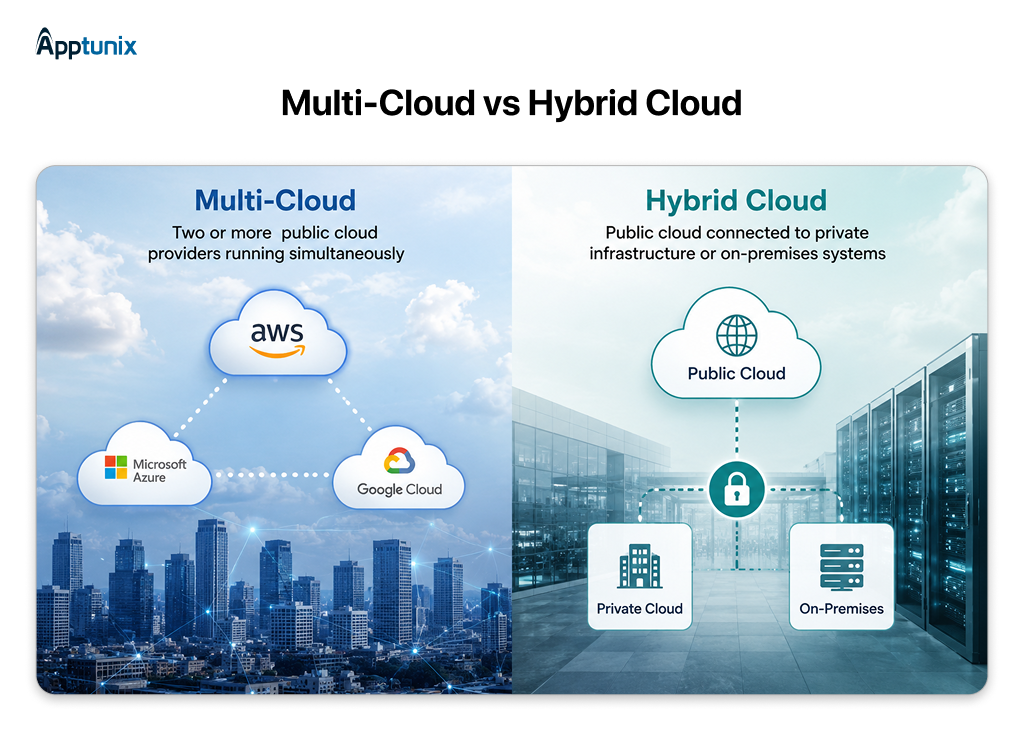
The distinction matters because the challenges are different. Multi-cloud is primarily a governance and portability problem; hybrid cloud is primarily a connectivity and latency problem. Most large enterprises end up running both. Sensitive workloads stay on private infrastructure; everything else is distributed across public clouds based on what each provider does best.
There is usually a moment that pushes an enterprise toward a multi-cloud strategy. Maybe a pricing dispute with a vendor, a compliance requirement that one cloud can’t meet, or a team that already built half a product on a different provider. The reasons vary, but the underlying drivers tend to be the same across most organisations. Here are the four that come up most consistently.
A lot of enterprises don’t actually choose multi-cloud, but they arrive at it. One team picks AWS, another has always used Azure, and a recent acquisition brought in a GCP environment nobody fully understands. Suddenly, you’re running three clouds without a strategy to tie them together. This is accidental multi-cloud, and it’s far more common than most organisations admit.
The difference between that and a deliberate enterprise multi-cloud strategy is that governance has a clear operating model, shared tooling, and defined ownership across every environment you run. Most of the complexity enterprises struggle with traces back to this distinction.

Going multi-cloud comes with a real operational cost. More tools to manage, more teams to align, more complexity at every layer. So the benefits need to outweigh that genuinely. For most enterprises running at scale, they do. Let’s discuss the benefits of multi cloud strategy when the strategy is done right.
->You stop being a captive customer
When leaving is genuinely an option, renewal conversations look very different. Enterprises running multi-cloud get better pricing, more flexible contracts, and far less pressure to accept terms that don’t work for them.
->Better workload placement across platforms
Every cloud provider has areas where it performs better than the rest. Enterprise systems like cloud-based ERP platforms are a good example. Multi-cloud lets you route each workload to where it actually runs best.
->Resilience that holds up when a provider goes down
When one provider has an outage, a multi-cloud setup gives your team a clear rerouting path. What would have been a company-wide incident becomes a contained, manageable problem.
->Data residency and compliance without a full migration
Some regulations require specific data to stay within certain geographic boundaries. Multi-cloud lets you place those workloads in the right location without rebuilding your entire architecture around that one requirement.
->Adopt new capabilities on your timeline, not your vendor’s
Cloud providers don’t all ship new capabilities at the same time. With multi-cloud, your teams can pick up what’s useful from whichever provider releases it first. This matters especially for AI-driven workloads, where teams running AI integration across ERP and legacy systems often depend on this flexibility to choose the right cloud for each integration layer.
->Real cost optimization across providers
When vendors know you have real alternatives, pricing and contract negotiations shift in your favour. That commercial leverage is one of the more underrated financial benefits of running multi-cloud.
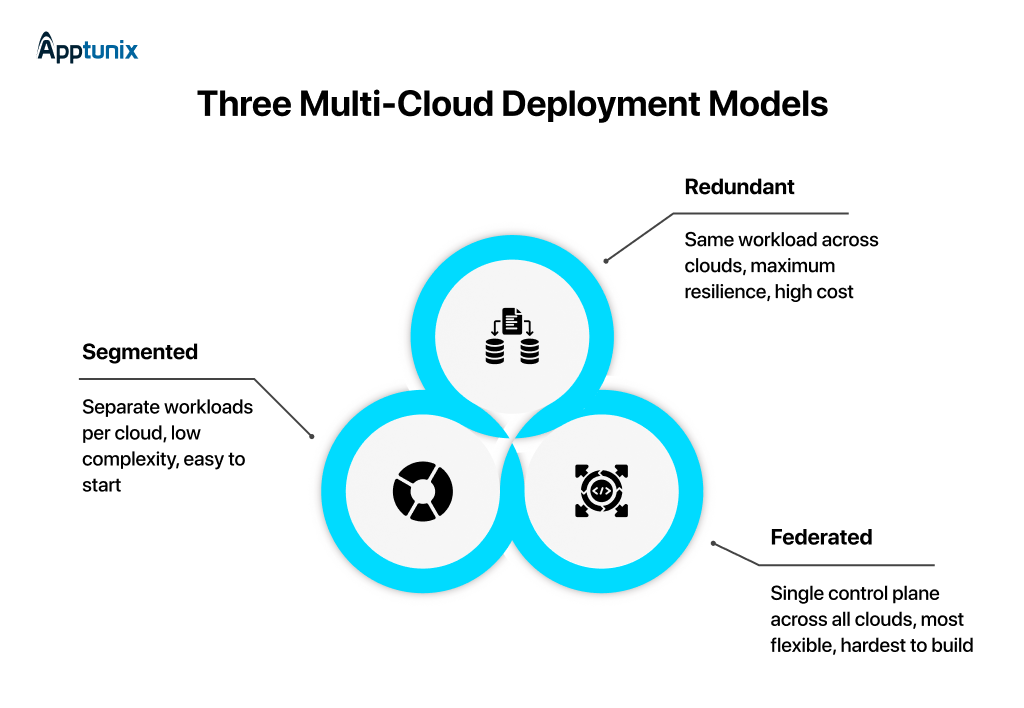
Not every enterprise runs multi-cloud the same way. The deployment model you choose shapes everything downstream – how complex your architecture gets, how much it costs to operate, and how much flexibility you actually end up with. There are three main patterns most enterprises land on.
Vendor lock-in happens when you want to switch from a cloud provider, but it becomes so technically complex or financially painful that you effectively can’t switch.
Most enterprises think that going multi-cloud automatically solves this. You can run three clouds and still be locked into all three. Through proprietary APIs, managed services with no portable equivalent, and data that’s too expensive to move. Avoiding lock-in is an architectural decision you have to make deliberately, not a side effect of signing with multiple vendors.
Most teams only realise they have a lock-in problem when they try to leave. Let’s decode the warning signs to check from right now:
Not everything needs to be portable, and that’s an important distinction. Over-engineering for portability adds unnecessary complexity. The goal is to know which parts of your architecture carry real switching costs and to protect those specifically.
Apart from architecture decisions, there are a few operational habits that consistently separate well-run multi-cloud environments from ones that quietly spiral into complexity.
Multi-cloud data protection is one of the most underestimated operational challenges enterprises face once they are running across more than one provider. Each cloud has its own encryption model, its own identity system, and its own compliance tooling. Without a deliberate approach, data security becomes inconsistent across environments—and the gaps only arise during audits or incidents.
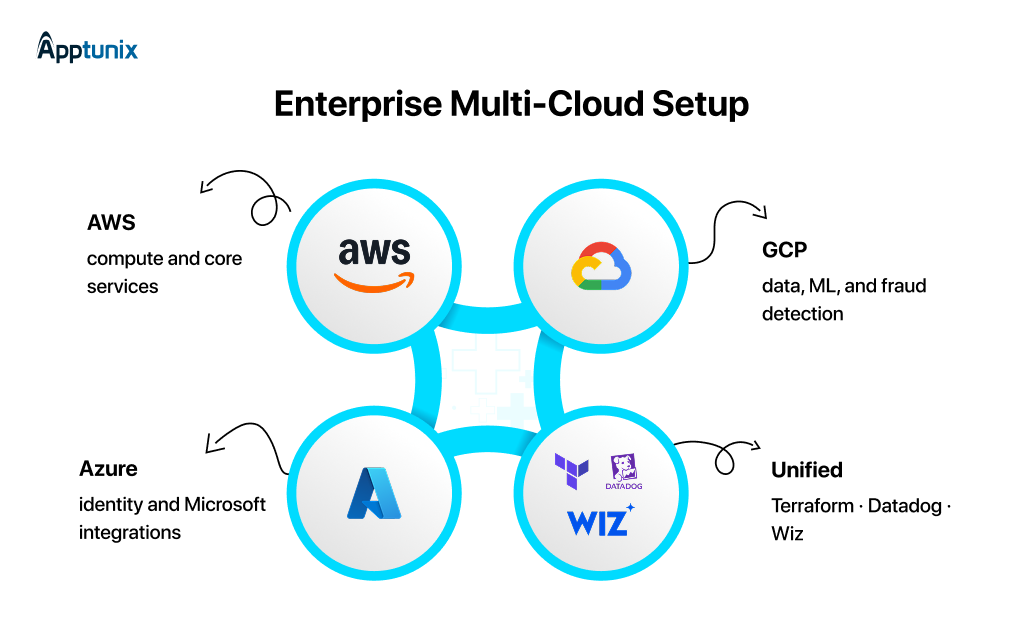
Across most enterprise multi-cloud migrations, the same structure tends to emerge, not because it is prescribed anywhere, but because it reflects what each provider actually does well.
How do most enterprises structure their Multi-Cloud deployment?
Multi-cloud managed services handle the operational layer so engineering teams stay focused on product work.
The teams that navigate this well share one thing in common. They made the hard architectural decisions before they needed to, not after. Portability choices like PostgreSQL over Aurora and Kafka over Kinesis look small early on but they determine whether a migration takes weeks or quarters.
Identity is almost always the blind spot. Three clouds with three IAM models and no federated layer compound quietly until it becomes the most painful problem in the environment. Get those two things right from the start, and the rest of the multi-cloud strategy tends to follow.
A mature multicloud strategy is not measured by how many clouds you run, but it is measured by how much control you retain across all of them. The enterprises that get this right are not the ones with the most sophisticated tooling.
They are the ones that made architectural decisions early on purpose: what stays portable, what governance looks like at the infrastructure level, and how data is protected across every provider they operate.
Multi-cloud adoption is not slowing down. The complexity that comes with it is not going away either. But it is manageable, and for enterprises looking to build that foundation right, Apptunix makes the difference between accommodating complexity and actually solving it.
Q 1.What is multi cloud in enterprise IT?
A multi cloud strategy means using more than one public cloud provider, such as AWS, Azure, and GCP, for different workloads instead of relying on a single vendor.
Q 2.What is the difference between multi-cloud and hybrid cloud?
Multi-cloud uses multiple public cloud providers. A hybrid cloud combines a public cloud with private infrastructure or on-premises systems. Most enterprises run both.
Q 3.Why are enterprises adopting multi-cloud strategies?
Most enterprises adopt multi-cloud strategies to avoid vendor lock-in, improve resilience, meet compliance requirements, and use the best services from each provider.
Q 4.What are the biggest benefits of multi cloud strategy?
The main benefits of multi cloud strategy include:
Q 5.What causes vendor lock-in in multi cloud environments?
Vendor lock-in usually happens through proprietary APIs, cloud-specific infrastructure templates, expensive data migration costs, and deeply embedded managed services.
Q 6.Which multi cloud deployment model works best for enterprises?
The best multi cloud deployment model depends on operational maturity. Segmented models are easier to start with, while federated multi-cloud architectures provide more flexibility at enterprise scale.
Q 7. What is multi cloud data protection?
Multi cloud data protection refers to securing workloads, backups, identities, and sensitive data consistently across multiple cloud providers using unified security and compliance controls.
Get the weekly updates on the newest brand stories, business models and technology right in your inbox.
With over 20+ years of experience in driving global digital initiatives, Nikhil Bansal is the CEO & Director of Apptunix. He specializes in orchestrating large-scale digital transformations, enterprise-grade software solutions, and high-level business strategies that redefine industry standards. Nikhil is known for his ability to bridge the gap between complex business challenges and innovative technology, helping Fortune 500 companies and startups alike achieve sustainable growth. A visionary leader, he empowers enterprises to navigate the digital landscape with agile, ROI-focused models and future-ready business strategies.
38 Views 9 min July 15, 2026

128 Views 9 min June 26, 2026

247 Views 9 min June 9, 2026
Book your consultation with us.
Book your consultation with us.


One Central, The offices 3, Level 3, DWTC, Sheikh Zayed Road, Dubai
+971 50 782 1690


Offer Ends Soon
Get a quick expert response in under 5 minutes.