
Cost to Build an App Like Eventbrite: Complete Development & Pricing Guide (2026)
20 Views 9 min September 16, 2026

Reena Bhagat, the CTO and Head of AI at Apptunix, is a seasoned technology strategist with a deep-rooted expertise in emerging technologies. With a focus on AI/ML integration, product engineering, cloud management, she leads the technical vision for high-performance SaaS infrastructures. Reena is recognized for building secure, scalable, and decentralized systems that solve real-world complexities. Her passion lies in leveraging data science and future-tech to create resilient digital products, making her a trusted authority for organizations looking to lead in the age of intelligent automation.
There’s a particular kind of meeting that happens in almost every large enterprise at least once a quarter. Someone on the leadership team asks a simple question: “How are we tracking against this?” And the honest answer is: nobody knows yet, because the dashboard that would tell them is two weeks out for a refresh, or the person who knows how to rebuild it left the company last spring.
That meeting is a symptom. The underlying disease is a business intelligence stack that was designed for a slower world. In fact, 44% of CXOs reportedly view legacy BI platforms as a strategic weakness. That’s what makes AI-powered analytics for enterprises a strong choice.
Enterprises aren’t abandoning business intelligence as a discipline. They’re moving forward with legacy business intelligence modernization processes to pace up.
This legacy business intelligence modernization guide walks through why that shift is happening now and how to migrate from legacy BI to AI-powered analytics. We’ll also discuss the benefits of AI-powered business intelligence and the cost of legacy BI modernization,
So, let’s get started!
Legacy BI is any analytics stack built around scheduled reporting and a rigid. If your team’s main way of “asking a question” of your data is filing a ticket, you’re running legacy BI.
It’s not that these platforms were badly built. Many of them were genuinely well engineered for the problem they were solving twenty years ago. The problem is that the underlying data landscape, and what “decision-makers” now expect from it, has moved a lot faster than these platforms were built to accommodate.
71% of companies say their legacy BI tools are hitting scalability limits. A few patterns tend to show up together once a BI environment has quietly crossed into legacy territory:
None of these individually is a crisis. Together, they’re a pretty reliable signal that you’re maintaining a platform rather than getting value from it.
The honest, unglamorous answer is that AI-powered analytics collapses the distance between “having a question” and “getting an answer.” Traditional BI gives you a curated set of prebuilt views of data that someone else decided was important. Here is the table:
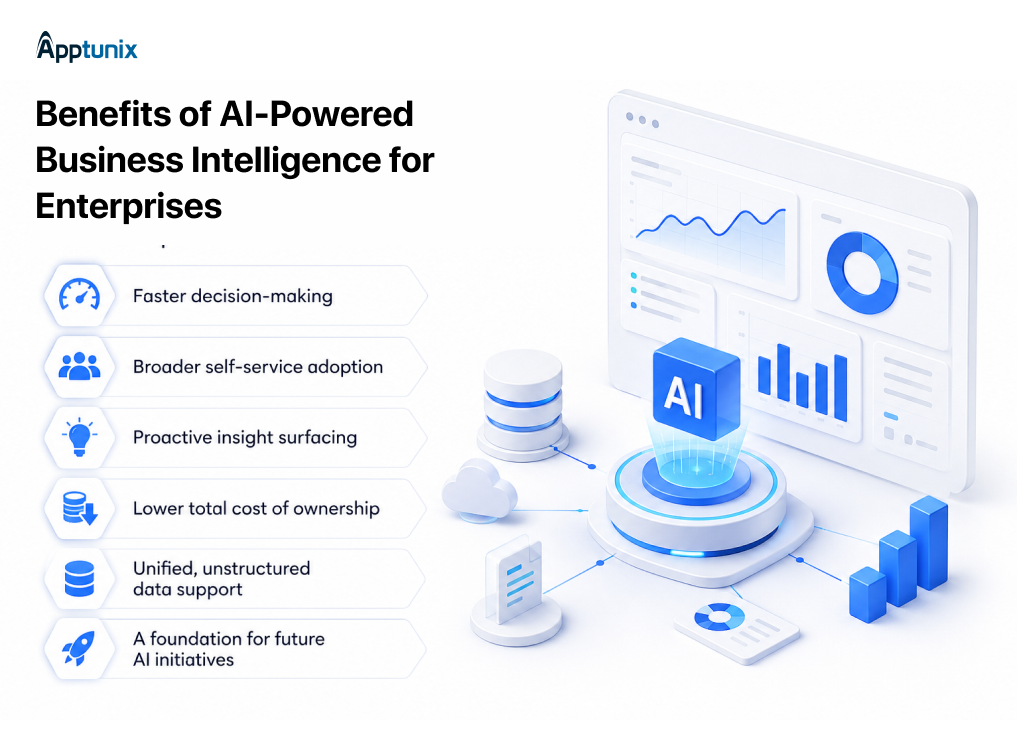
The global AI-powered analytics market is estimated at USD 25.4 billion in 2025 and projected to reach USD 95.8 billion by 2033, at a 18% CAGR. Once the foundation is right, the returns show up in fairly predictable places. Enterprises that move from legacy BI to intelligent business intelligence typically see gains across five areas:
1: Faster decision-making2: Broader self-service adoption3: Proactive insight surfacingLegacy dashboards wait for someone to notice a trend. Agentic systems don’t wait.
4: Lower total cost of ownershipCloud-native platforms typically cost less to operate than legacy enterprise licenses once maintenance and infrastructure overhead are factored in. This is a core economic driver behind most AI-powered analytics migration strategy decisions.
5: Unified, unstructured data supportContent legacy BI was never designed to touch becomes queryable alongside traditional structured data.
6: A foundation for future AI initiativesThe governed semantic layer and clean data pipeline built during migration become reusable infrastructure for everything that comes after.
Also Read: Build an AI Strategy for Your Enterprise Apps: Roadmap & Cost
There’s no shortage of advice online telling enterprises ” how to approach legacy BI migration,” but very little of it explains what to actually do. In practice, a well-run business intelligence modernization moves through five phases, and skipping any of them is usually where timelines quietly blow up.
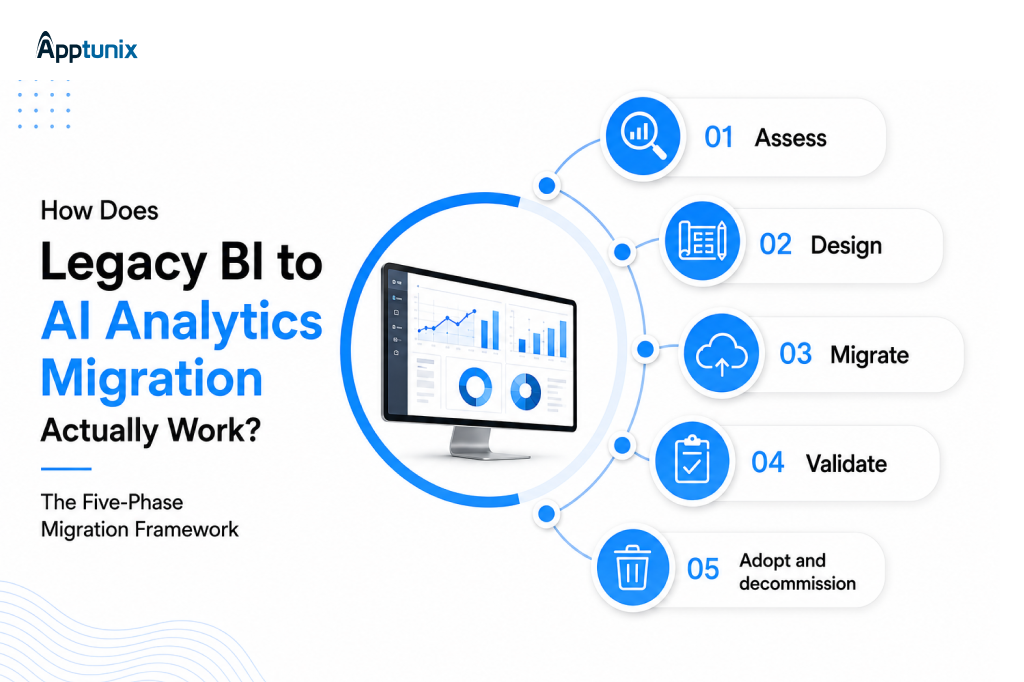
1. Assess:
Inventory what you actually have before migrating anything. Most enterprises are surprised by how many “critical” reports have almost no active viewers. Business intelligence migration practice consistently shows that 40–60% of legacy reports get retired outright as unused once usage analytics are actually run.
2. Design:
Decide on the target architecture. This means which cloud warehouse or lakehouse anchors the stack, how the semantic layer gets structured, and whether a data fabric or data mesh approach fits the organization better.
3. Migrate:
Move data, rebuild models, and migrate reports in parallel. Enterprises that attempt a “big bang” replacement usually discover, expensively, which reports they’d forgotten about.
4. Validate:
Run both systems in parallel for a defined window and reconcile metrics. The real acceptance test is “does it produce the same revenue number finance already trusts?”
5. Adopt and decommission:
Train users, then actually turn off the legacy platform on a committed date. This last step gets skipped more than any other, and it’s usually why organizations end up paying for two BI stacks indefinitely.
For a mid-sized migration, a realistic compressed timeline looks like this:
Also Read: The Total Cost of Ownership of AI Automation vs Manual Processes
The process of integrating AI into a legacy system for intelligent business intelligence is structured. Below is a practical sequence for enterprises approaching business intelligence modernization:
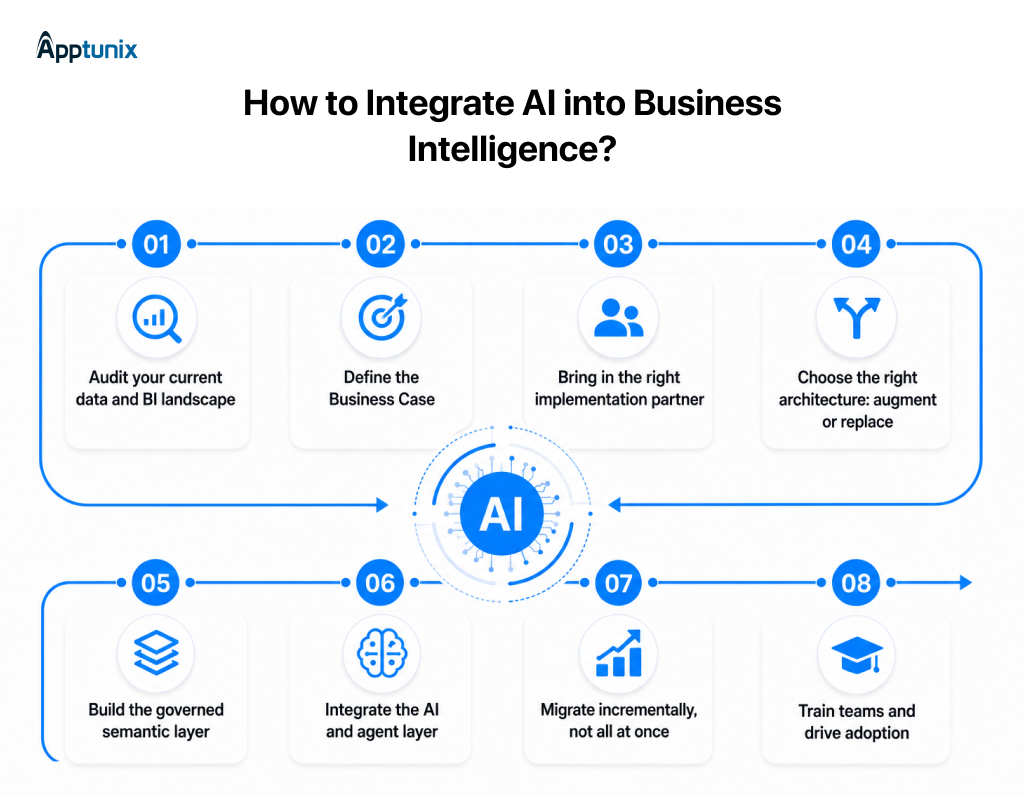
Before any AI analytics platform conversation happens, you need a clear picture of what you’re working with.
AI-powered analytics for enterprises succeeds when it’s tied to outcomes.
Few internal teams have done this migration before:
This is the core decision point in most business intelligence migration guide frameworks.
This is the foundation every intelligent business intelligence system depends on:
This is where AI-driven business analytics actually comes to life for end users.
A rushed legacy business intelligence modernization effort is the most common way these projects fail.
The best AI analytics platform delivers no value if nobody trusts or uses it.
This is the question that actually gets projects funded or shelved. Here is the table for better understanding:
Note: You must partner with an experienced AI development firm to avoid any hidden costs. A reliable partner makes sure your AI-driven business analytics platform works effectively in the long run.
Research from IBM’s Cost of a Data Breach analysis found that organizations hampered by outdated technology suffer roughly 28% higher breach costs than those on modern infrastructure.
A governance checklist worth running during migration:
This is a good moment to loop in whoever owns data governance at your organization rather than treating it as a downstream IT concern.
Layering AI onto a BI stack that wasn’t designed for it rarely works. The underlying architecture has to shift first. Here’s what changes at the infrastructure level to legacy business intelligence modernization:
Snowflake, Databricks, and Microsoft Fabric provide the governed storage and compute layer everything else sits on. Which one you choose matters less than making sure it’s genuinely governed and well-documented.
Often conflated, but solving different problems. Data fabric is a design concept that provides a metadata-driven layer connecting fragmented data environments, and it’s increasingly becoming the architectural foundation for scalable AI and real-time analytics. Data mesh, by contrast, is an organizational model. Most enterprises end up needing elements of both.
The retrieval layer that makes natural-language analytics accurate. Gartner projects that GraphRAG will be used by 40% of enterprises by 2029 to improve the factual accuracy of AI-generated responses for complex queries.
Migrating from legacy BI to AI-powered analytics is a change-management project running simultaneously, and most in-house teams are stretched too thin to run everything well at once. That’s where a dedicated AI development company like Apptunix earns its place.
With work spanning 500+ AI integrations deployed across 35+ industries, Apptunix’s teams have encountered most of the platform-specific quirks that turn a clean migration plan into a messy one.
Our teams cover the full path from data readiness assessment through custom AI product development services. We have worked with 500+ global clients on end-to-end IT consulting and digital transformation.
Ready to modernize your business intelligence with AI? Contact Apptunix today, and let us build your AI-powered BI solutions that drive your organization toward scalable success.
Q 1.Why are enterprises replacing legacy BI now?
The prime reasons why businesses are replacing legacy BI with AI-powered analytics are rising maintenance costs, scalability limits, and growing user demand for self-service and natural-language access. Moreover, Gartner is cited as warning that around 40% of IT budgets are consumed by technical debt, with legacy systems being a major driver.
Q 2.What's the difference between augmented analytics and agentic analytics?
Augmented analytics uses machine learning to help surface patterns and automate parts of analysis. Agentic analytics goes further, applying autonomous AI agents that can independently investigate a question and generate recommended actions with minimal human prompting.
Q 3.How does a legacy BI to AI analytics migration work?
It runs through five phases:
Q 4.How long does a legacy BI migration typically take?
A focused departmental migration can run around 90 days. Full enterprise-wide migrations involving hundreds of dashboards and deep system integrations more commonly take 6 to 8 months.
Q 5.What's the biggest risk in a BI migration?
The risk in change management for legacy BI modernization is often about technology. Migrations tend to succeed when organizations invest as much in training and adoption as they do in the platform itself, and tend to stall when adoption is assumed to happen automatically.
Q 6.Which legacy BI platforms are hardest to migrate away from?
Custom, in-house reporting systems tend to be hardest, since reporting logic is often undocumented. Among commercial platforms, SAP BusinessObjects and IBM Cognos typically carry more migration complexity than Power BI or Tableau.
Q 7.Should we run this migration in-house or with an implementation partner?
Internal teams typically understand business context best; specialized partners typically move faster through the technical and governance work because they’ve run similar migrations before. Most successful projects combine both — internal ownership of business logic, partner-led execution of the migration itself.
(1 ratings, average: 5.00 out of 5)
Get the weekly updates on the newest brand stories, business models and technology right in your inbox.
Reena Bhagat, the CTO and Head of AI at Apptunix, is a seasoned technology strategist with a deep-rooted expertise in emerging technologies. With a focus on AI/ML integration, product engineering, cloud management, she leads the technical vision for high-performance SaaS infrastructures. Reena is recognized for building secure, scalable, and decentralized systems that solve real-world complexities. Her passion lies in leveraging data science and future-tech to create resilient digital products, making her a trusted authority for organizations looking to lead in the age of intelligent automation.
20 Views 9 min September 16, 2026
11 Views 9 min September 14, 2026

31 Views 9 min September 8, 2026
Book your consultation with us.
Book your consultation with us.


One Central, The offices 3, Level 3, DWTC, Sheikh Zayed Road, Dubai
+971 50 782 1690