How to Build a Travel Platform Like Expedia?
10 Views 12 min July 31, 2026

Pallavi Nautiyal is a seasoned Tech Consultant at Apptunix, specializing in the intersection of global finance and decentralized technology. With a deep-rooted expertise in banking infrastructure, digital payment gateways, and Web3 ecosystems, she guides businesses through the complexities of modern financial engineering. Pallavi is recognized for her ability to architect secure, compliant, and scalable solutions—ranging from smart contracts and crypto-wallets to robust digital banking platforms. Her strategic insights help organizations navigate regulatory landscapes while leveraging the power of Blockchain to ensure transparency and seamless user experiences in every transaction.
Notion started as a simple note-taking app fighting for space on your phone. Now it has become the product every business wants to recreate.
That shift isn’t luck. It’s proof that all-in-one digital workspace app development solves a problem nobody else fixed: too many tools, not enough focus. Teams juggled Trello for tasks, Google Docs for notes, and Slack for chaos. Notion killed the juggling act. Businesses now want that same magic, minus the compromise.
If you’re exploring how to build an app like Notion, you’re chasing a market that’s about to explode.
According to Polaris Market Research, the global digital workplace market is projected to hit $394.66 billion by 2034, and workspace consolidation is driving most of that growth. Enterprises aren’t satisfied with off-the-shelf software anymore. They want workspaces built around their workflows, not the other way around. That’s why custom Notion-like software development services are gaining serious traction among CTOs and product teams.
Curious what goes into building something this powerful? Let’s break down exactly what it takes to build Notion-level software, step by step.
Notion is an all-in-one workspace app built on a modular block-based model.
It treats every paragraph, database entry, image, and embed as a unique content block. Users can nest these blocks to build custom workflows without writing code.
Notion earned its place by removing the constant switch between single-purpose tools. It brings notes, task management, and relational databases into one live, collaborative canvas. For growing teams, that flexibility fixes scattered, fragmented data.
This is exactly why demand for productivity software development keeps climbing. Organisations want the same modular power, while keeping tight control over their own data.
A clear concept is only the start. Next, let’s look at the features that turn an empty canvas into a workspace people rely on.
If you’re planning to build an app like Notion, features will decide whether users stay or leave. A clean interface may attract attention, but practical functionality keeps people productive. The goal isn’t to add everything. It’s to solve everyday work challenges with features people naturally rely on.
Given below is the core set of features every strong app like Notion needs:
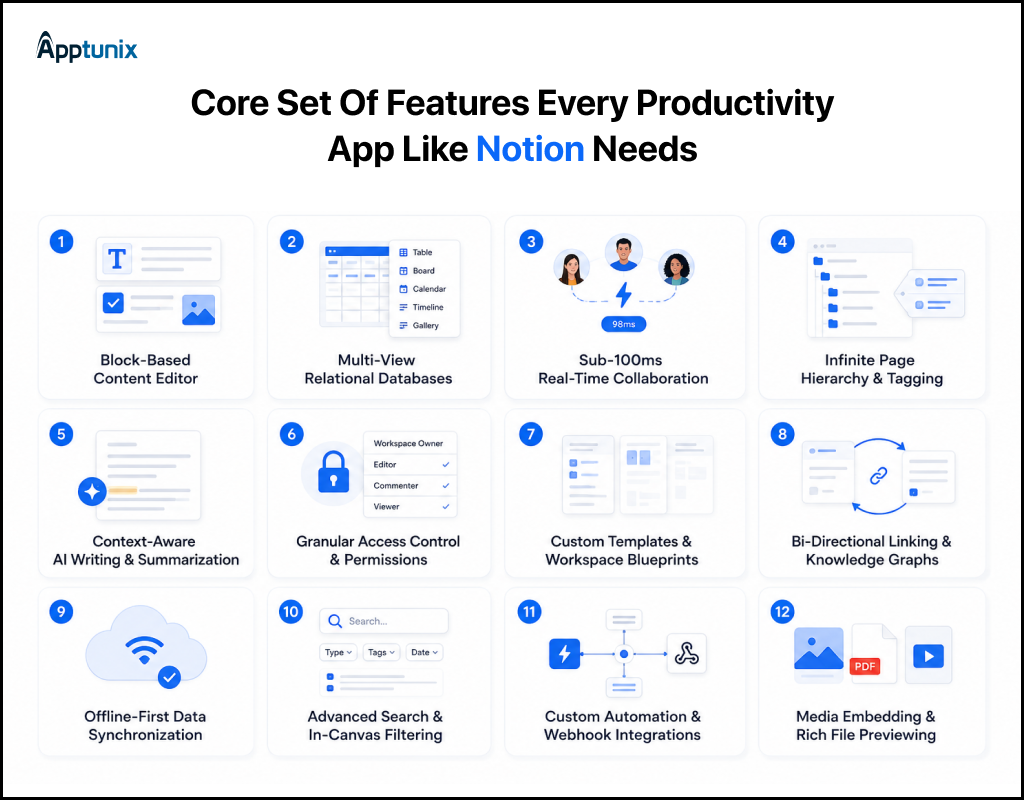
1. Block-Based Content EditorEvery piece of text, image, or table acts as an independent content block with a unique ID. Users can instantly drag, drop, nest, and reformat elements. This modularity powers modern workspace app development by turning static documents into flexible, dynamic layouts.
2. Multi-View Relational DatabasesUsers need to view the same underlying dataset in multiple contexts. Supported formats must include Kanban boards, tables, calendars, timelines, and gallery views. For example, a single product roadmap table easily converts into a sprint timeline without duplicate data entry.
3. Sub-100ms Real-Time CollaborationMultiplayer editing is essential for note-taking app development. Your architecture must handle concurrent edits with live cursors and presence indicators without data loss. Without Conflict-free Replicated Data Types (CRDT) or Operational Transformation (OT) algorithms, user edits overwrite each other instantly.
4. Infinite Page Hierarchy & TaggingNested sub-pages allow teams to organize complex knowledge bases without cluttering the UI. Users quickly build interconnected internal wikis using slash commands and bi-directional linking. This structure serves as the primary backbone for any all-in-one workspace app.
5. Context-Aware AI Writing & SummarizationModern AI productivity app development demands deeply integrated LLM tools inside the document canvas. Users leverage AI to summarize long meeting notes, draft emails, or query workspace databases directly. For example, typing /ai instantly generates actionable task lists from raw transcript blocks.
6. Granular Access Control & PermissionsWorkspace security depends on precise role-based access control (RBAC). Admins can share individual pages publicly, keep sub-pages restricted, or grant view-only access to external contractors. Skipping granular permissions prevents enterprise customers from migrating sensitive company data to your platform.
7. Custom Templates & Workspace BlueprintsPre-built structural templates accelerate onboarding for first-time users. Whether setting up an engineering sprint tracker or a simple habit log, one-click templates eliminate the cold-start problem. Custom template sharing also creates an active ecosystem that drives viral organic user growth.
8. Bi-Directional Linking & Knowledge GraphsLinking pages together creates a relational web of internal documentation. When Page A links to Page B, Page B automatically renders a backlink reference. This keeps interdepartmental projects synchronized and allows users to navigate interconnected ideas like a second brain.
9. Offline-First Data SynchronizationUsers expect to draft notes on flights or during internet outages. Local-first storage writes changes immediately to IndexedDB or SQLite on the client device. Once a network connection restores, background sync engines merge offline operations smoothly with the central server database.
10. Advanced Search & In-Canvas FilteringAs workspace databases expand to thousands of records, instant search becomes critical. Integrating full-text search engines like Elasticsearch or Typesense allows users to surface buried documents instantly, tagged records, or specific block contents across massive organizational hierarchies in milliseconds.
11. Custom Automation & Webhook IntegrationsTo act as a central hub, your platform must connect with external toolstacks like Slack, GitHub, and Figma. Custom triggers automatically create workspace database records when a developer opens a pull request or an external form receives a submission.
12. Media Embedding & Rich File PreviewingUsers avoid uploading files to apps that force downloads to view content. Your block engine must natively render interactive Figma prototypes, YouTube videos, PDF previews, and code snippets directly inside the document canvas for frictionless internal documentation.
These are the essentials. But to stand out from established players, your app needs a smarter layer sitting on top.
To capture market share from incumbents, your platform must offer modern intelligence that goes beyond static note-taking. Integrating these 6 advanced features ensures your solution stands out in modern AI productivity app development.
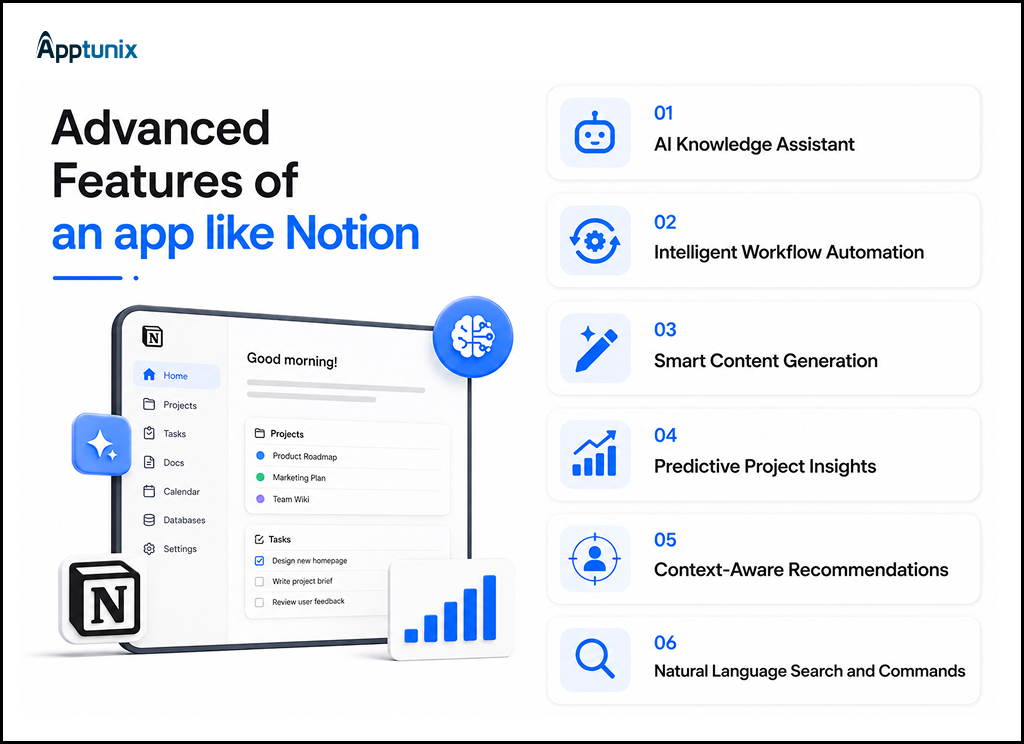
1. AI Knowledge AssistantAs company data grows, finding the right information becomes time-consuming. An AI assistant can answer questions using workspace content, summarize lengthy documents, and surface relevant pages instantly. For example, instead of searching ten folders, users can simply ask, “What’s our latest onboarding process?”
2. Intelligent Workflow AutomationRepetitive tasks slow teams down. AI-powered workflows can automatically assign tasks, update project statuses, send reminders, and trigger approvals based on predefined conditions. This reduces manual effort while keeping projects moving without constant follow-ups.
3. Smart Content GenerationWriting meeting notes, project briefs, or documentation from scratch takes time. AI can generate first drafts, rewrite content, create summaries, and convert discussions into structured documents. This capability has become a key differentiator in modern AI productivity app development.
4. Predictive Project InsightsProjects often show warning signs before deadlines slip. AI can analyze workloads, task dependencies, and completion trends to identify potential delays early. Managers gain actionable insights instead of reacting after problems have already affected delivery.
5. Context-Aware RecommendationsA smarter workspace understands user behavior. It can recommend relevant templates, suggest linked documents, highlight frequently accessed resources, or surface unfinished tasks based on ongoing work. These personalized experiences improve adoption and reduce the time spent searching for information.
6. Natural Language Search and CommandsUsers shouldn’t need to remember exact document names or complex filters. Natural language search lets them type requests like, “Show marketing plans from last quarter” or “Create a product roadmap for July.” Combined with advanced AI integrations, this creates a faster, more intuitive user experience and strengthens the value of your app, similar to Notion.
Knowing what to build is one thing. Turning that vision into a working product is another. Here is the path teams trust during Notion app development.
Every successful product starts long before developers write the first line of code. That’s especially true when you build an app like Notion. You’re not creating a simple note-taking tool. You’re building a platform where documents, databases, collaboration, automation, and AI work together without friction.
Skipping a step may save time initially, but it often leads to expensive fixes after launch. Here’s the Notion app development process that experienced teams follow to build reliable software.
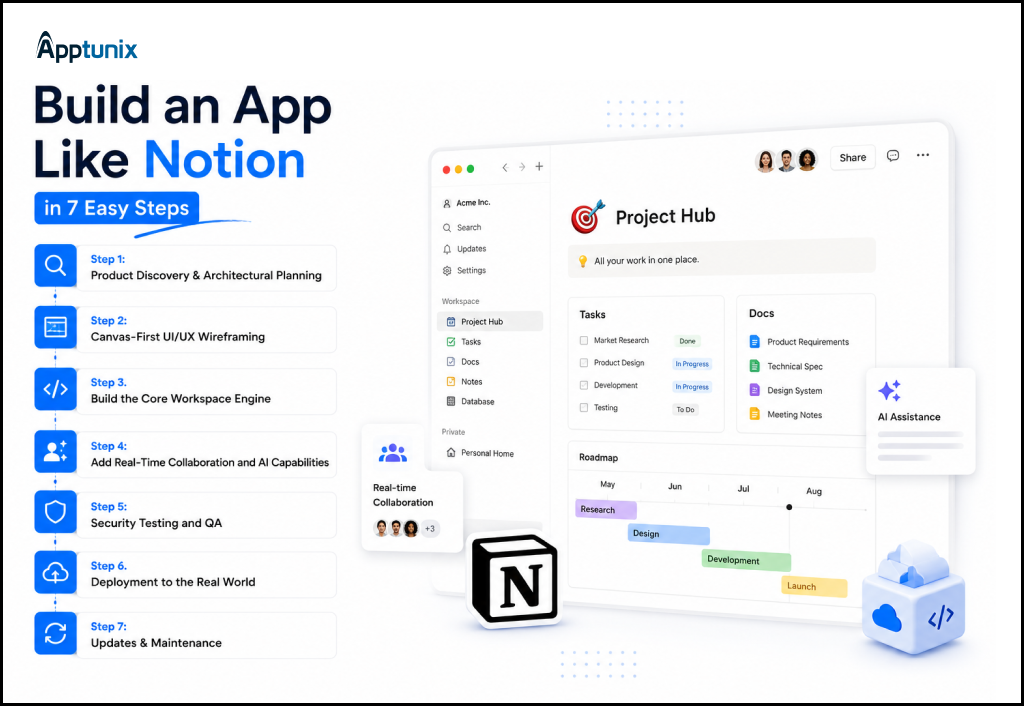
Step 1: Product Discovery & Architectural PlanningBefore development begins, define the purpose of your platform. Who will use it? What problems will it solve? Which workflows should it simplify?
This phase typically includes:
For example, a law firm and a marketing agency both need a workspace. Yet their documents, permissions, and collaboration needs differ a lot. This discovery phase ensures your workspace app development project is built around real business needs instead of assumptions.
Step 2: Canvas-First UI/UX WireframingUsers expect clean, distraction-free workspaces. Designers map user journeys, drag-and-drop interactions, responsive sidebars, and slash-command menus. What if a first-time user lands on a blank canvas? Wireframes must include clear onboarding tooltips, sample templates, and contextual menus. This design foundation keeps complex nested content simple to navigate.
Step 3: Build the Core Workspace EngineThis is where your application starts taking shape.
Developers build the foundation that powers documents, pages, nested content, databases, permissions, and collaboration. Every action users perform relies on this backend infrastructure.
A strong productivity software development strategy ensures the platform can handle growing data volumes without sacrificing speed or reliability. If this layer isn’t designed for scale, performance issues usually appear as user adoption increases.
Step 4: Add Real-Time Collaboration and AI CapabilitiesUsers expect changes to appear instantly.
When one person updates a document, everyone should see those changes in real time without refreshing the page. That requires efficient synchronization, conflict resolution, and reliable cloud infrastructure.
Once collaboration is stable, AI becomes the next layer of value. Through modern AI development services, businesses can introduce document summarization, intelligent search, meeting note generation, workflow suggestions, and content assistance.
Carefully planned AI integrations improve productivity by supporting users in their work rather than interrupting it.
Step 5: Security Testing and QAWhat happens when 50 team members edit the same database offline and reconnect at once? Quality assurance teams perform intense stress testing to catch conflict bugs, race conditions, and sync errors. Security engineers run penetration tests, verify Role-Based Access Control (RBAC) permissions, and enforce end-to-end encryption to safeguard enterprise workspace data.
Step 6: Deployment to the Real WorldDeployment is much more than publishing an application.
The production environment must support scalability, monitoring, backups, analytics, and infrastructure management from day one. Many businesses also begin with a limited rollout, allowing selected users to provide feedback before expanding to a wider audience.
This gradual release strategy helps identify usability improvements while minimizing operational risks.
Step 7: Updates & MaintenanceNotion-style apps never stop evolving. User feedback drives new features, performance fixes, and design tweaks month after month. This is why choosing a genuine custom productivity software development company matters more than a one-time freelancer. Long-term support keeps your Notion app development project relevant as user needs shift.
A solid process needs the right tools behind it. So which technologies hold up when thousands of users arrive at once?
Picking the right stack decides whether your app scales or breaks under pressure. Here’s what actually works for Notion-like productivity app development.
1. FrontendReact or Next.js works best for building flexible, block-based interfaces. Both handle dynamic content updates smoothly, which matters when users drag, drop, and rearrange blocks constantly.
2. BackendNode.js or Django power the core logic behind your workspace app development project. They handle complex operations like real-time syncing and permission management without slowing down.
3. DatabaseThis is where most Notion clones succeed or fail. PostgreSQL works well for relational data, while MongoDB suits flexible, block-based content structures. Many teams use both together, depending on the data type.
4. Real-time syncWebSockets or Firebase handle live updates across devices. Without this layer, your all-in-one workspace app feels broken the moment two people edit together.
5. AI layerOpenAI or custom-trained models power features like smart search and content generation. This is the backbone of any real AI development services offering built into your product.
6. Cloud infrastructureAWS or Google Cloud provide the scalability needed as your user base grows. Storage, backups, and uptime all depend on choosing infrastructure that won’t buckle under traffic spikes.
7. Security toolsOAuth, JWT, and end-to-end encryption protect user data across every workspace. Skipping this step isn’t an option once you’re handling sensitive business information.
No single stack fits every project. The right combination depends on your app’s scale, budget, and long-term roadmap. That’s exactly why experienced teams building an app similar to Notion test multiple configurations before locking in a final architecture.
With the stack mapped out, the obvious question follows. How much should you budget to build an app like Notion?
Calculating the cost to develop an app like Notion requires looking beyond simple UI development. You are investing in a real-time collaboration engine, modular data architectures, and high-concurrency cloud infrastructure.
The real cost to create an app like Notion ranges between $20,000 and $150,000+. That’s a wide range, and it should be. Your final number depends on features, complexity, and how ambitious your vision really is.
A simple MVP with basic notes and task management sits at the lower end. Add real-time collaboration, AI integrations, and advanced databases, and costs climb fast. Think of it less as an expense and more as an investment in market position. Notion itself proved this model can generate serious revenue at scale.
Businesses that treat Notion app development as a corner-cutting exercise usually pay twice. Once for the rushed version, and again for the rebuild. Investing properly upfront protects your timeline and your budget long-term.
Here’s a realistic cost breakdown based on app type and complexity:
These figures are guide ranges only. Your exact quote depends on scope, region, and team.
Budget aside, this is a hard product to build well. Here are the challenges teams hit, and how the best solve them.
On paper, a productivity platform may look straightforward. In reality, it’s one of the most complex software products to develop. You’re combining document management, databases, collaboration, permissions, search, and AI into one seamless experience.
That’s why many businesses underestimate what it takes to build an app like Notion. Here are three challenges that deserve attention from day one.
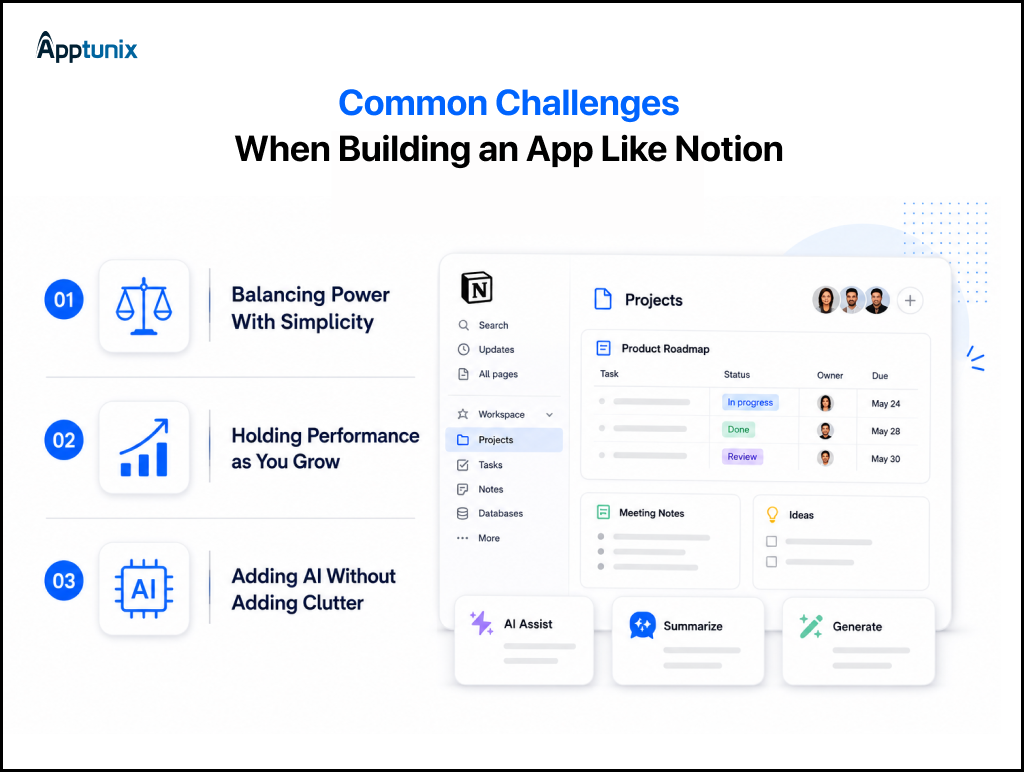
1. Balancing Powerful Features with a Simple User ExperienceAdding more functionality doesn’t always create a better product. In fact, packing every feature into the first release often overwhelms users and makes navigation confusing.
Introduce features gradually and build intuitive workflows from the beginning. A clean interface, logical navigation, and contextual guidance help first-time users become productive quickly. Successful workspace app development is about reducing friction, not increasing feature count.
2. Maintaining Real-Time Performance as the Platform GrowsAs more users join the platform, it has to process document edits, comments, file uploads, and database updates simultaneously. Without the right architecture, performance issues become inevitable.
Build a scalable backend with optimized database queries and reliable real-time synchronization. This technical foundation keeps the platform fast and responsive, making it essential for long-term Notion-like productivity app development as users and data continue to grow.
3. Integrating AI Without Complicating the User JourneyAI can easily become another feature that users ignore if it interrupts their workflow or adds unnecessary complexity.
Focus on practical use cases that genuinely save time. Features like document summaries, intelligent search, meeting notes, and workflow recommendations fit naturally into daily work. Well-planned AI productivity app development, supported by robust AI development services, creates experiences that save time without adding complexity.
Solve those, and you have a product worth paying for. So how do successful workspace apps turn users into steady revenue?
Building a great product is only half the equation. Turning your all-in-one workspace app into a sustainable business is the other half. Here’s how successful Notion-style platforms actually make money.
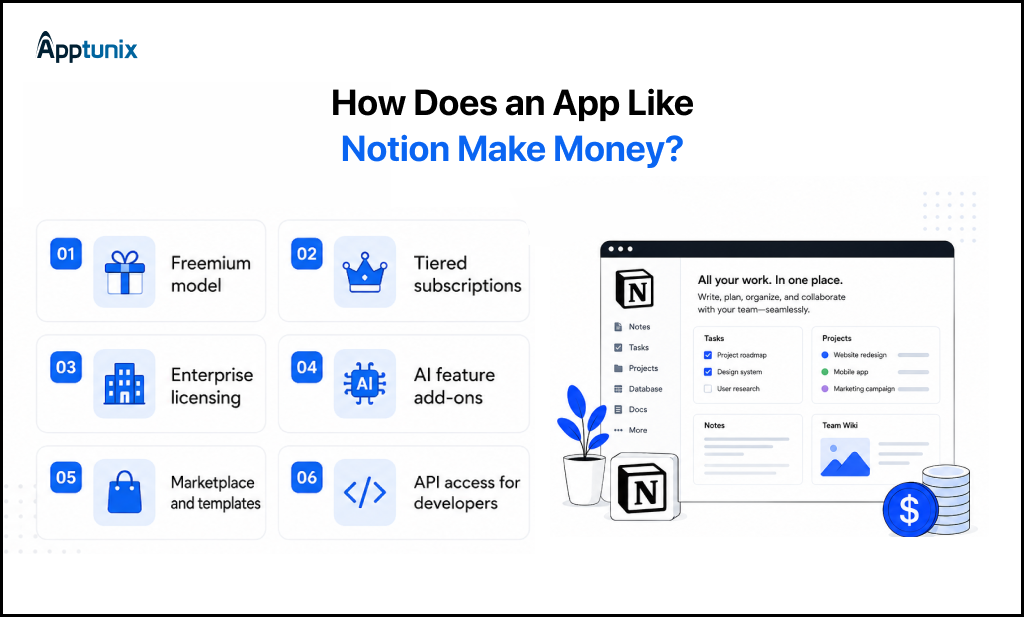
1. Freemium modelOffer core features free, then charge for advanced blocks, storage, or AI tools. This is the exact model Notion used to build its massive user base before monetizing further.
2. Tiered subscriptionsCreate pricing tiers based on team size, storage limits, or feature access. A solo user pays less than a 50-person company running full workflows through your platform.
3. Enterprise licensingLarge organizations pay premium rates for dedicated security, admin controls, and priority support. This tier often generates the highest revenue per customer, even with fewer total accounts.
4. AI feature add-onsCharge separately for advanced AI productivity app development features like content generation or predictive task management. Users who want automation are usually willing to pay extra for it.
5. Marketplace and templatesLet users buy or sell templates, plugins, and integrations within your platform. This creates a secondary revenue stream while boosting engagement across your user base.
6. API access for developersOffer paid API access so businesses can build custom integrations. This turns your app into infrastructure other companies build on top of, not just a standalone tool.
Mixing two or three of these models usually works better than betting everything on one. The right combination depends on your target users and how they expect to pay.
As businesses move away from scattered tools, the demand for a true all-in-one digital workspace app development partner keeps growing. Companies want one platform that handles notes, tasks, and team collaboration without friction. Building that kind of product takes more than good design. It takes real engineering depth.
As a leading custom productivity software development company, Apptunix specializes in building scalable, block-based platforms suited for modern teams. We understand what it takes to develop an app like Notion, from flexible database architecture to real-time sync that never breaks.
Apptunix brings over 13 years of product engineering experience to every project. Today, our team of 500+ technology specialists has delivered more than 2,000 digital products for businesses across 50+ countries. That experience helps us identify technical challenges early and build solutions that scale with confidence.
With a proven track record across the GCC and global markets, we help businesses create intuitive, AI-powered workspace platforms. Additionally, our team works with advanced technologies including AI integrations, automation engines, and cloud-native infrastructure built to scale.
Q 1.How do you build an app like Notion from scratch?
To build an app like Notion, start by identifying the problem your app will solve and the users it will serve. Then design the user experience, develop core features like notes, databases, collaboration, and AI, test the platform thoroughly, and launch an MVP. Once users provide feedback, improve the product through regular updates and new features.
Q 2.How much does it cost to build an app like Notion?
The cost to build an app like Notion typically ranges from $20,000 to $150,000+. A basic MVP costs less because it includes only essential features. More advanced platforms with AI, real-time collaboration, enterprise security, and third-party integrations require a larger investment due to increased development complexity.
Q 3.How long does it take to develop an app like Notion?
Building an app like Notion usually takes 2 to 8+ months, depending on the project’s complexity. A basic MVP can be developed in about two to three months, while a fully featured productivity platform with AI, real-time collaboration, and enterprise capabilities may require up to a year or more.
Q 4.How do you choose the right productivity app development company for your project?
Choose a company that has proven experience in productivity app development and understands scalable SaaS products. Before making a decision, evaluate:
A reliable partner focuses on your business goals, not just writing code.
Q 5.Why build a custom workspace app instead of using off-the-shelf software like Notion?
Building custom software gives your business total control over proprietary data, unique workflows, and platform costs. Conversely, Off-the-shelf solutions carry per-seat fees that scale exponentially and lack deep customization. Moreover, a custom workspace eliminates recurring licensing costs, protects sensitive intellectual property, and lets you monetize custom tools by selling access to client or partner networks.
Q 6.How do block-based document editors handle performance with large amounts of data?
Instead of loading an entire document at once, block-based editors process content in smaller sections. This improves loading speed and editing performance, even for large documents. Techniques like lazy loading, caching, efficient indexing, and real-time synchronization also help maintain a smooth experience as data grows.
Q 7.Can a custom Notion alternative integrate with my existing enterprise tools like Jira, Slack, or GitHub?
Yes. A custom Notion alternative can integrate with popular business tools such as Jira, Slack, GitHub, Google Workspace, Microsoft 365, Salesforce, and many others through APIs. These integrations reduce manual work, keep information synchronized across platforms, and allow teams to manage projects without constantly switching between different applications.
(2 ratings, average: 5.00 out of 5)
Get the weekly updates on the newest brand stories, business models and technology right in your inbox.
Pallavi Nautiyal is a seasoned Tech Consultant at Apptunix, specializing in the intersection of global finance and decentralized technology. With a deep-rooted expertise in banking infrastructure, digital payment gateways, and Web3 ecosystems, she guides businesses through the complexities of modern financial engineering. Pallavi is recognized for her ability to architect secure, compliant, and scalable solutions—ranging from smart contracts and crypto-wallets to robust digital banking platforms. Her strategic insights help organizations navigate regulatory landscapes while leveraging the power of Blockchain to ensure transparency and seamless user experiences in every transaction.
Book your consultation with us.
Book your consultation with us.


One Central, The offices 3, Level 3, DWTC, Sheikh Zayed Road, Dubai
+971 50 782 1690


Offer Ends Soon
Get a quick expert response in under 5 minutes.