AI in Saudi Arabia Healthcare: Use Cases & Current Regulatory Landscape
10 Views 16 min July 31, 2026

With over 20+ years of experience in driving global digital initiatives, Nikhil Bansal is the CEO & Director of Apptunix. He specializes in orchestrating large-scale digital transformations, enterprise-grade software solutions, and high-level business strategies that redefine industry standards. Nikhil is known for his ability to bridge the gap between complex business challenges and innovative technology, helping Fortune 500 companies and startups alike achieve sustainable growth. A visionary leader, he empowers enterprises to navigate the digital landscape with agile, ROI-focused models and future-ready business strategies.
AI integrated mobile apps are no longer a thing of the future; they are significantly influencing our interaction habits with our mobile devices on a daily basis. Whether you are trying to build a perfect frame for your pictures or trying to ensure the data available on your device is not breached, AI is always there in the background. However, there’s a small twist in the story – On-Device AI vs Cloud AI – they both are quite different.
Some AI is locally stored in the devices we use, while others use powerful cloud servers. The smart apps, however, use a combination of both.
When developing an AI-integrated mobile application, you might come across a very crucial question: “Do you want to deploy the AI on the device or in the cloud?” This may sound like a technical question to some; however, it’s going to impact all other factors, including privacy, speed, UI/UX, and overall cost.
You can end up with either a slow app that just eats up RAM on a user’s device or one that is swift and dependable. Before you add AI, you must understand the app’s core functionality.
First, we must understand both concepts before we start the comparison between on-device AI and cloud AI architectures. With clarity on the difference between both i.e, (on-device AI for mobile apps and cloud AI for mobile apps) will help you decide which one you should go with for your project.
On-device AI is when the AI model is within the user’s phone. The intelligence is integrated directly on the device processor, which is the main CPU, the graphics processor, or a dedicated chip that is made just for AI (if you can get technical).
Let’s understand it with an example:
No server round-trip. No data is being sent to other locations. You will not have to wait for the cloud to think about your request. Just local instant processing. This is what real-time AI in the mobile app does.
The opposite way is done by cloud AI. The data is transported to faraway servers—large and sophisticated data centers run by businesses like OpenAI, Google, and Microsoft. They do the thinking for you on these servers and return the results to your app. This is typical cloud-based AI applications architecture.
Common examples:
The trade-off is simple: If you want to send your data to these cloud servers, you will have to wait for them to respond, and they will be way more powerful than your server. To grasp the capabilities of AI processing in mobile applications, it is essential to understand these key distinctions.
Here’s where it gets real. Before deciding which approach you should take with your app, you should know how they work in the real-world. Let’s explore the On-Device AI vs Cloud AI performance comparison that matters most.
Imagine you are creating a photo editing app. The user clicks a picture and requires a preview of the picture after he/she applies different filters. Here’s where the real-time usage of AI in mobile apps comes into play.
With on-device AI: The AI models are the machine learning algorithms that run on the device itself. The filter preview will refresh automatically in real time when the user swipes through the options. It’s instant! No network delay!
With cloud AI: The app sends images to the server, waits till it comes back and updates previews. Even with a Superfast internet connection, this is 200-500 milliseconds of lag. If you have a slow internet connection: 2-3 seconds. Your user starts to wonder, “Is the application broken?”
That’s why Apple and Google, and other platform companies are advocating for on-device AI for mobile apps to enable real-time features. Mobile UX research shows that delays of more than 100 milliseconds begin to feel sluggish for consumers. That is typically exceeded by cloud round trips.
Winner: On-device AI to enhance real-time experiences.
However, there’s a catch: Not all of the features have to be real-time. When performing a complex analysis, which could take 5 seconds either way, cloud AI for mobile apps may yield better results; however, the user doesn’t care.
If an AI is used on a local/personal device, the user must not worry about personal data being compromised. Any information related to his/her health, finances, biometrics, or identity should not fall into anyone’s hands other than his. One of the most significant advantages of on-device AI in mobile apps is its ability to contain the data within the user’s device.
Consider a healthcare app that monitors patient symptoms. Because on-device AI for mobile apps means that the medical information doesn’t go anywhere through the internet. You keep it. Your compliance team sleeps better. Security scans are quicker. There are fewer questions for regulators. The privacy and latency in AI mobile apps have become much easier.
However, don’t get the terms confused: “on-device” does not necessarily mean “private.”
There are a few things you need to consider:
If you have an app that uses AI locally but uploads the entire conversation history to the server, that isn’t very private. The good news? These are questions you can answer. It’s simply a matter of making the decision.
Privacy advantage? Yes, but only if you do it correctly.
Cloud AI is easier to build, right? You call an API. You get a response. Done.
On-device AI requires:
It’s real work. When developing AI-powered mobile apps, this added complexity may not fit into the existing team’s workflow.
But the problem is, many teams begin with cloud-based only and then end up regretting it once costs and latency issues become a problem. They end up doing the hard work anyway, just under time pressure.
A smarter approach? Consider this right from the beginning and plan a hybrid approach.
You can also contact an AI development service provider for better AI adoption strategy.
Believe it or not, the answer to “on-device or cloud?” is becoming more and more “yes.” The best AI-powered mobile apps use both tactics with the goal of maximizing the benefits.
Take Apple’s approach. Basic voice recognition is being performed on-device by Siri. But complex understanding? Well, that one goes into the cloud. Both occur smoothly, and you’re not even aware of the transition.
Google’s strategy with Android is the same. On-device machine learning is used to perform simple classification tasks locally. Complex reasoning takes to the skies. The user only experiences a neat feature which is fast and functional.
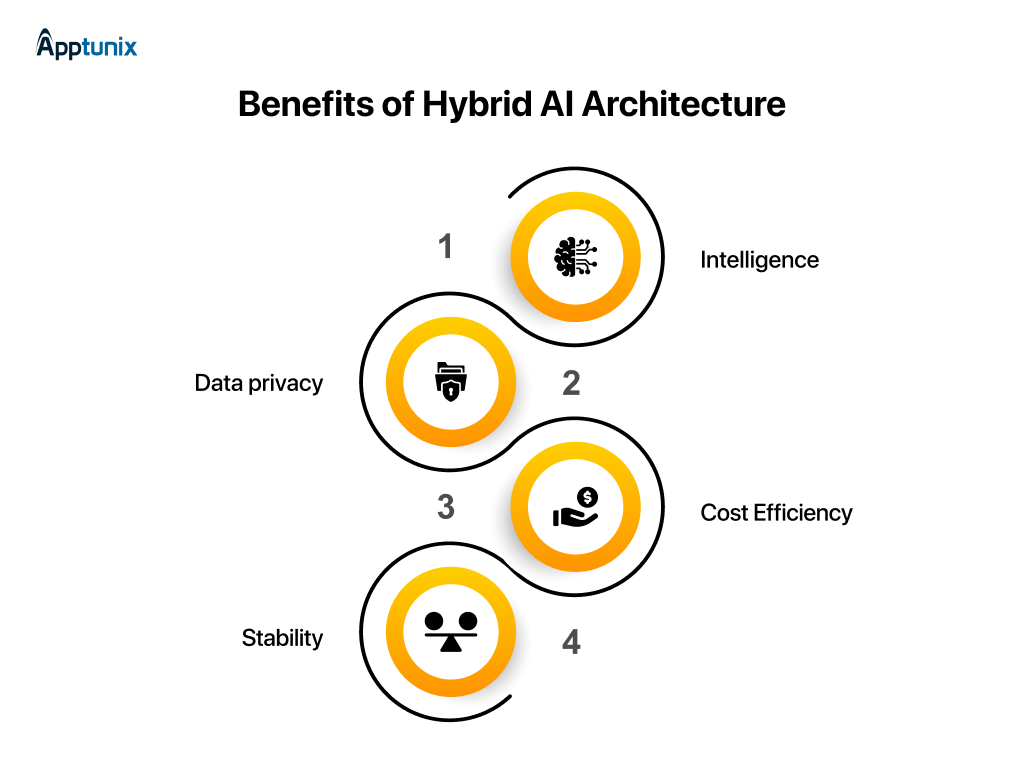
This is where real magic takes place. The most successful AI-included mobile applications have a combination of both on-device and cloud. The balance is to create an app that users absolutely adore.
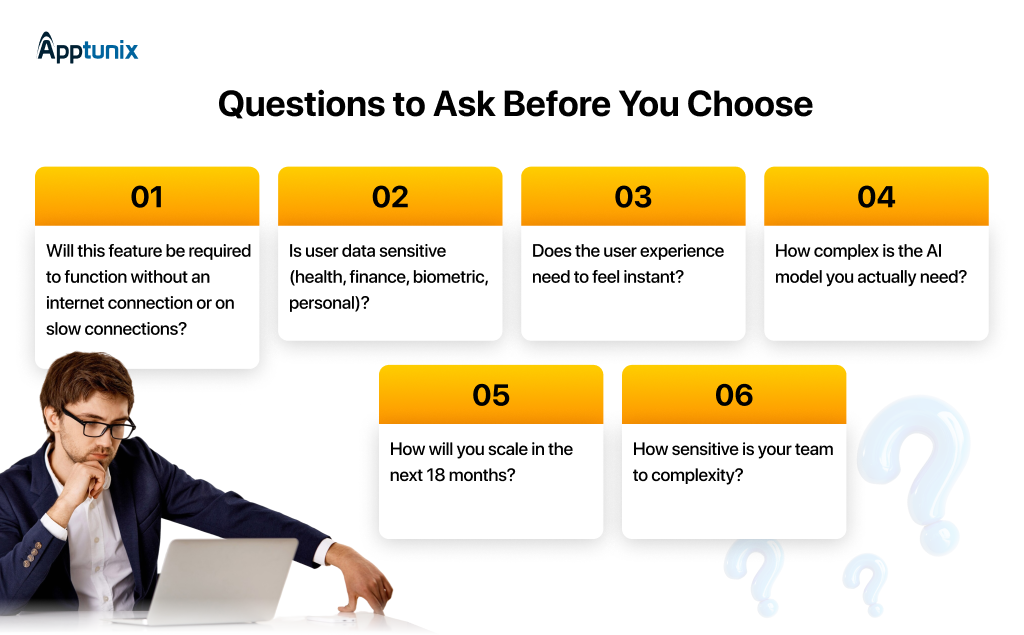
Forget the hype. Forget what’s trendy. How to decide between on-device AI and cloud AI for your mobile apps:
Also learn how to choose between Custom AI vs Off-the-Shelf Solutions →
When integrating AI in mobile app development, here’s what makes sense. Let’s now pass through the steps needed to have the most efficient AI processing in mobile applications.
Check them in the real-world on real networks, battery conditions, and devices. To understand where the tradeoffs lie for your use case, build a Proof of Concept (PoC) to compare on-device AI performance and cloud AI performance. You can also build an MVP before you move on to building a larger app.
This is the basic structure most of the modern AI-powered mobile apps have. It does not look stylish or fashionable, but it serves its purpose. Design how AI processing in mobile apps will flow between local and cloud components. Learn more about hybrid AI architecture strategies.
Now that you are aware about the steps you must take before moving forward, let’s understand the development process that the AI-integrated custom software development company you partner with must follow.

AI is rapidly transforming how modern businesses build products, automate workflows, and deliver personalized user experiences. For any AI-powered mobile apps development company you are working with, success depends on far more than simply integrating AI models into an application.
A clear AI development framework can significantly mitigate risks associated with deployment, enhance scalability, manage costs, and guarantee sustained performance. Each step, from strategy to data preparation, deployment, and optimization, is crucial. Here are all the steps that you must take while developing an AI-powered mobile app:
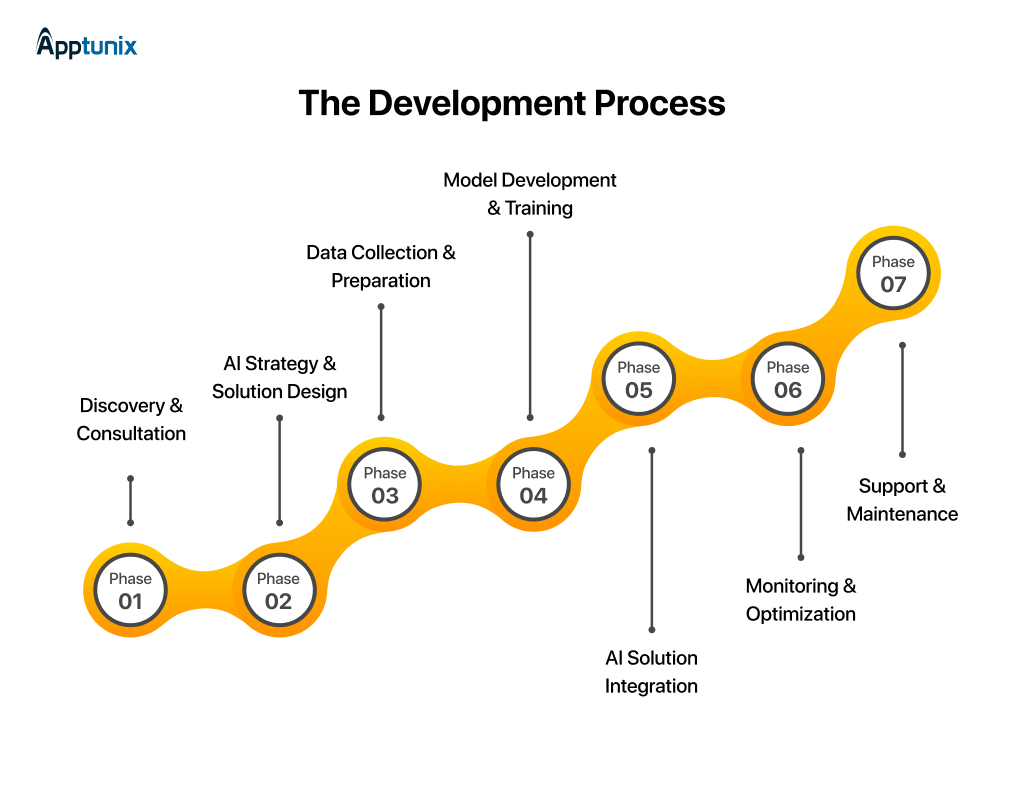
First, in this step, know the business goals, problems, and current infrastructure. This helps to evaluate on-device, cloud AI, and hybrid approaches — understand use cases, performance needs, resources, scalability, and privacy requirements — and develop an AI strategy that is perfectly suited to vision.
Key focus areas:
In this step, begin by creating a specific AI strategy and choosing which models to use. Quantization, pruning, and distillation should start first on the device. The first step of cloud work is to have a solution blueprint that is clearly defined and directly solves a specific business need, which requires pre-trained model selection, fine-tuning, and fallback mechanism planning.
Key focus areas:
In this step, begin to identify, collect, and organize data from a variety of sources, using high-quality standards. Prototyping and real-device testing should start simultaneously to ensure accurate latency, battery consumption, memory consumption, device compatibility, and edge cases are addressed, and to get a reliable data set and a realistic range of performance baselines before the full product is developed. Estimates should be viewed as guidelines, rather than promises of production behavior.
Key focus areas:
In this step, begin to construct models that identify meaningful patterns and work well with existing models. The integration of SDK, API design, error handling, logging, caching strategy, and CI/CD pipelines needs to be set up from the beginning, followed by operational tuning on actual devices in an iterative manner. Be prepared for changes in device use to settle out and plan accordingly.
Key focus areas:
During this step, move toward aligning the deployment of the model in operational workflows. On-device updates should start in app release cycles, cloud updates in instant deployment pipelines. Dynamic model downloading and feature flags are critical to achieve the precise rollout of the models, and to reduce the impact on the integration process, the decision should be made before the rollout.
Key focus areas:
This step begins with building continuous monitoring with respect to latency, precision, error rate, device impact, user satisfaction, and cloud costs. Optimization needs to start on production data as soon as deployment goes live — so that AI frameworks can adapt to changing conditions and can evolve over time after going live, rather than stagnating once deployed.
Key focus areas:
In this step, you will begin by establishing long-term support before scaling up. All of these issues of cost management, heterogeneity handling, and smart routing for hybrid approaches need to be dealt with initially. To ensure AI continues to function effectively with system growth, it is crucial to have sustained maintenance, system evolution planning, and proactive drift management in place.
Key focus areas:
Model size, device variation, degradation of accuracy, network reliability, complexity of the updates, unexpected charges, and privacy compliance.
The problem with pure approaches is that there are drawbacks. Successful teams develop flexible buildings, get started with prototypes early on, test early on real devices, and obsess about it in production.
However, if you take the help of an AI-powered mobile apps development firm that helps you employ the right approaches and best practices to deployment, combined with business-specific needs, the AI models and these mobile apps can give the user an intelligent experience that is reliable and scalable. Development teams can create AI-powered applications that satisfy users, companies can keep applications that are both cost-efficient and sustainable, and organisations can expand their applications with confidence over time.
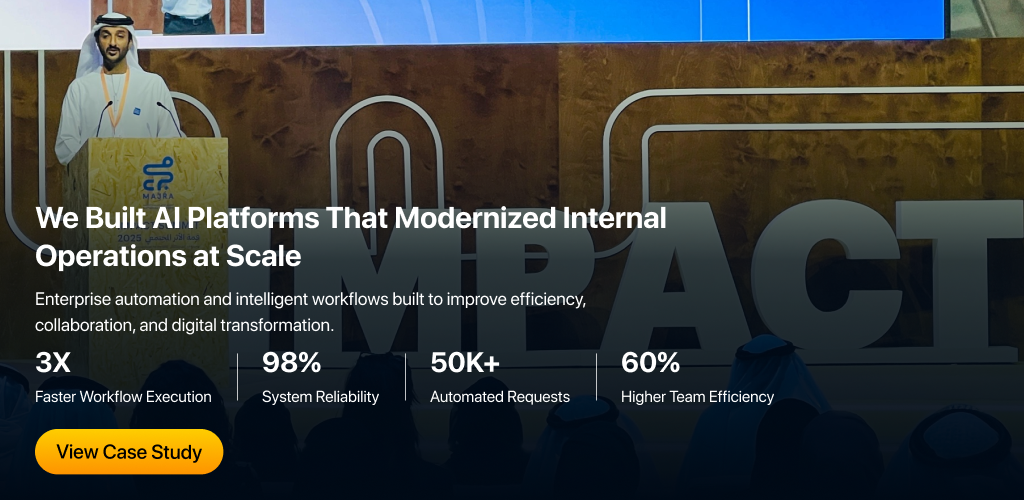
A real-world example of this is the AI-powered platforms we built, which delivered 3x faster workflow execution, achieved 98% system reliability, automated over 50K requests, and improved team efficiency by 60% — helping organizations streamline operations, scale with confidence, and build sustainable digital workflows.
The cost of AI deployment becomes quite different when it’s performed in the cloud or on the device. Cloud AI has low upfront costs, near-instant scalability, and pricing by usage on the upside at scale. The high cost of building model optimizations, conducting quality assurance tests, and hiring specialized ML professionals upfront makes on-device AI more expensive to build, but cost-saving over time once launched.
The most cost-efficient AI systems rarely choose one approach exclusively. Instead, leading architectures route workloads based on complexity and frequency:
This hybrid AI Adoption Strategy can reduce cloud spend significantly compared to cloud-only architectures, while preserving access to advanced reasoning capabilities when needed.
Before shipping an AI feature, model the economics at 10× expected volume across:
Many AI products fail financially, not because the technology breaks, but because the inference economics do.
On-device AI vs cloud AI doesn’t have a clear-cut solution to it. There is, of course, a practical aspect; stick to what will benefit your users best, that is, at a reasonable cost and complexity that your team can manage.
In most cases, for most modern applications, it is a mix of both — on-device for fast, private, offline experiences and cloud for heavy lifting and cutting-edge intelligence.
Begin with the “need” of the user. Speed up and build trust. Scale with confidence — it’s that is what makes apps that users love vs apps users simply tolerate.

Q 1.Which approach is better for apps targeting emerging markets with inconsistent connectivity?
On-device AI is very popular in emerging markets. 2G/3G networks are prevalent in these areas, and connectivity is often weak, making cloud AI not only untrustworthy but also inaccessible. On-device models mean that the app will still work even when the network isn’t great.
Q 2.Can on-device AI models be stolen or reverse-engineered by bad actors?
Yes, it is a legitimate concern that is not usually addressed. An AI model you include in your application can be physically located on the user’s device. An attacker with determination can retrieve the model weights by using tools such as Netron or Frida. To reduce this: encrypt model data at rest, model obfuscation, deploy lightweight models on the device, and keep your core proprietary model in the cloud.
Q 3.How do AI regulations like the EU AI Act affect the choice between on-device and cloud AI?
The EU AI Act sets transparency, auditability, and data governance rules based on the risk level of your AI system. Cloud AI deployments need to prove compliance with GDPR and localisation regulations. Documentation of the use and decision logic of on-device AI is necessary, but data transfer exposure is minimized. For high-risk AI systems (healthcare, biometrics, credit), there are strict requirements, regardless of the deployment mode.
Q 4.What happens to the AI experience when a user upgrades to a new phone?
Cloud AI is seamless — the performance remains the same because compute is on servers. On-device AI allows for a newer device to execute the same model at a higher speed, or even to access higher-level variants of a model. But migration should be managed appropriately: on-device data – fine-tuned preferences, local embeddings – should be transferred or rebuilt on the new device. If not handled, users lose a tailored experience they’ve built up over time.
Q 5.Is it possible to fine-tune or retrain an AI model directly on the user's device using their data?
Yes — it is referred to as federated learning or on-device fine-tuning. There are frameworks such as TensorFlow Lite and Core ML that can facilitate limited on-device training. This is the technique used by Apple’s Create ML service and Google’s Gboard app. Each user’s personal data is used to improve the model without this data ever leaving the device, and optionally, aggregated (anonymized) gradient increments may be returned to improve the global model. This takes a lot of getting right, but it does allow for a lot of personalization and privacy.
Q 6. How does the choice affect app store approval and platform guidelines from Apple and Google?
Apple and Google have guidelines specific to AI. The App Review policy states that apps employing on-device AI (particularly generative AI features) may not generate harmful content, but it is the developer’s responsibility, not the model provider. AI applications that are integrated into the cloud have to make their practices on data usage very transparent in the privacy labels. If the dynamically downloaded model weights change the functionality of the app after submission, they will need extra scrutiny by Apple.
Q 7.What are the accessibility implications of each approach for users with disabilities?
On-device AI can greatly enhance accessibility without a network – including real-time transcription, screen readers, and gesture control. In settings like hospitals, where people might be in noisy environments or areas with limited connectivity, these features can be invaluable. Cloud AI can, however, provide more accurate and nuanced language understanding, helping users who have speech challenges and are using voice interfaces. The most accessible applications leverage on-device for rapid access to accessibility components, and cloud for more intricate interpretation requests.
Q 8.How do you handle model versioning when different users are on different app versions with different embedded models?
This is one of the least talked about operational difficulties of on-device AI. Users who don’t update the app may be using model versions that are different from the current versions. Common best practices are: use feature flags to phase out the behaviors of the model, version the model in a way that is independent of your app (e.g., using on-demand modules for Android or Background Asset Downloads for iOS), and understand the need for a compatibility layer in your backend when the model’s server-side behavior matters.
Q 9.Does using cloud AI expose your app to vendor lock-in risks, and how do you avoid them?
Absolutely. Creating a tight dependency on OpenAI, Google, or AWS AI APIs results in a great deal of lock-in — if the API changes its pricing, is deprecated, or goes down, your app is affected. To help with this, consider the following mitigation steps: abstract calls to AI behind a provider-agnostic interface in your codebase, always use at least two different providers, and consider open-weight models (such as LLaMA or Mistral) that can be self-hosted. On-device AI with open models does not require dependency on a specific vendor but increases your maintenance cost.
Q 10.How should startups with limited ML expertise approach the build vs buy decision for AI models?
In the early days, cloud AIs (buy) are the right call for startups lacking in-house ML teams, as the iteration speed and frontier models are more important than costs at low volumes. Once you have product-market fit, predictable usage patterns, and in-house ML expertise or a trusted model optimization partner, on-device AI (build) is more beneficial. Initial investment in new products on the device can result in loss of trust by users before the product is validated, which can cause under-performing devices to be sent out.
Get the weekly updates on the newest brand stories, business models and technology right in your inbox.
With over 20+ years of experience in driving global digital initiatives, Nikhil Bansal is the CEO & Director of Apptunix. He specializes in orchestrating large-scale digital transformations, enterprise-grade software solutions, and high-level business strategies that redefine industry standards. Nikhil is known for his ability to bridge the gap between complex business challenges and innovative technology, helping Fortune 500 companies and startups alike achieve sustainable growth. A visionary leader, he empowers enterprises to navigate the digital landscape with agile, ROI-focused models and future-ready business strategies.
10 Views 16 min July 31, 2026
47 Views 16 min July 21, 2026
95 Views 16 min July 2, 2026
Book your consultation with us.
Book your consultation with us.


One Central, The offices 3, Level 3, DWTC, Sheikh Zayed Road, Dubai
+971 50 782 1690


Offer Ends Soon
Get a quick expert response in under 5 minutes.