Smart City App Development: Connecting Citizens, Infrastructure, and Data
11 Views 10 min July 24, 2026

As the Design Lead (UI/UX) at Apptunix, Sandeep Singh brings a decade of experience in crafting human-centric digital experiences. He specializes in intuitive product design, user psychology, and aesthetic storytelling that elevates brand identity. Sandeep is dedicated to building seamless interfaces that balance form and function, ensuring every digital touchpoint is engaging and accessible. By combining design-thinking with data-driven insights, he helps businesses transform complex workflows into delightful user journeys that drive high retention and market success.
For years, software companies competed to build better screens. Better layouts, buttons, and better app experiences.
Now, the screen itself is starting to disappear.
People are talking to devices, using gestures, and completing actions without even opening an app. That shift is turning Zero UI app development into one of the fastest-moving areas in tech.
The market is growing fast, too. The global Zero UI application market was valued at $36.23 billion in 2025 and is expected to reach $105.72 billion by 2030.
But building a screenless product is not the same as building a traditional app. The cost of building a Zero UI app is different. The technology behind it is more complex.
And the Zero UI vs Traditional UI debate is forcing founders, businesses, and investors to rethink what the next generation of software should look like.
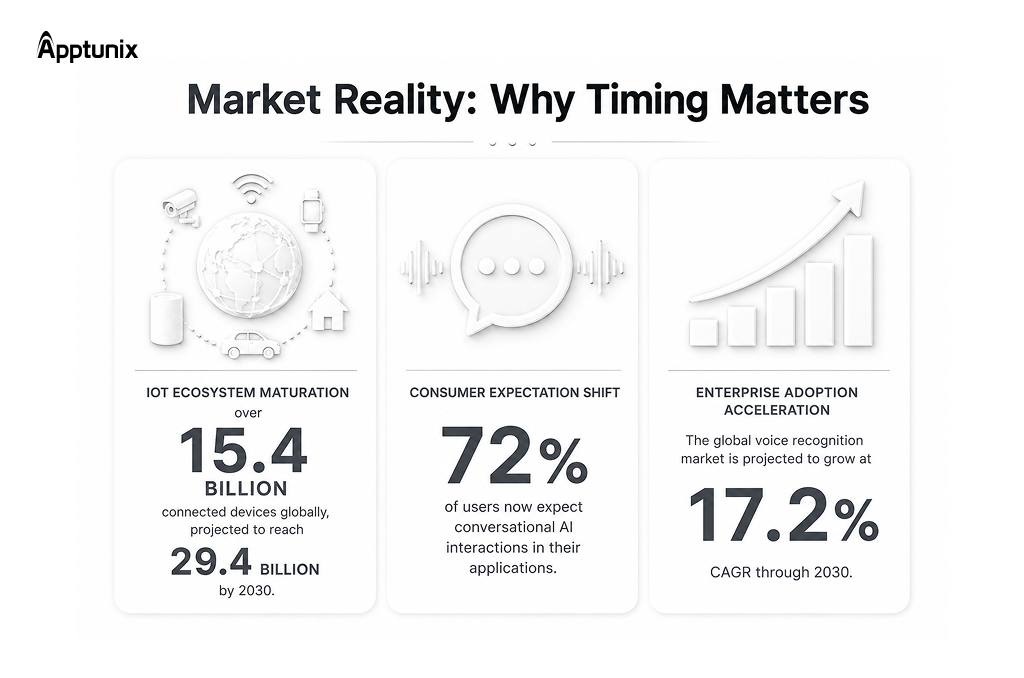
But before concluding, let’s look at the real market insights first:
The convergence of three critical technologies is making Zero UI viable now:
Now that opportunities are clear and having established the clear advantage of going with this technology, let’s dive deep into the Zero UI mobile app development process.
Building a Zero UI mobile app involves leveraging technologies like voice recognition, gesture control, and haptic feedback to create seamless, screenless interactions.
This guide outlines the fundamental steps and considerations for developers looking to innovate in this space.
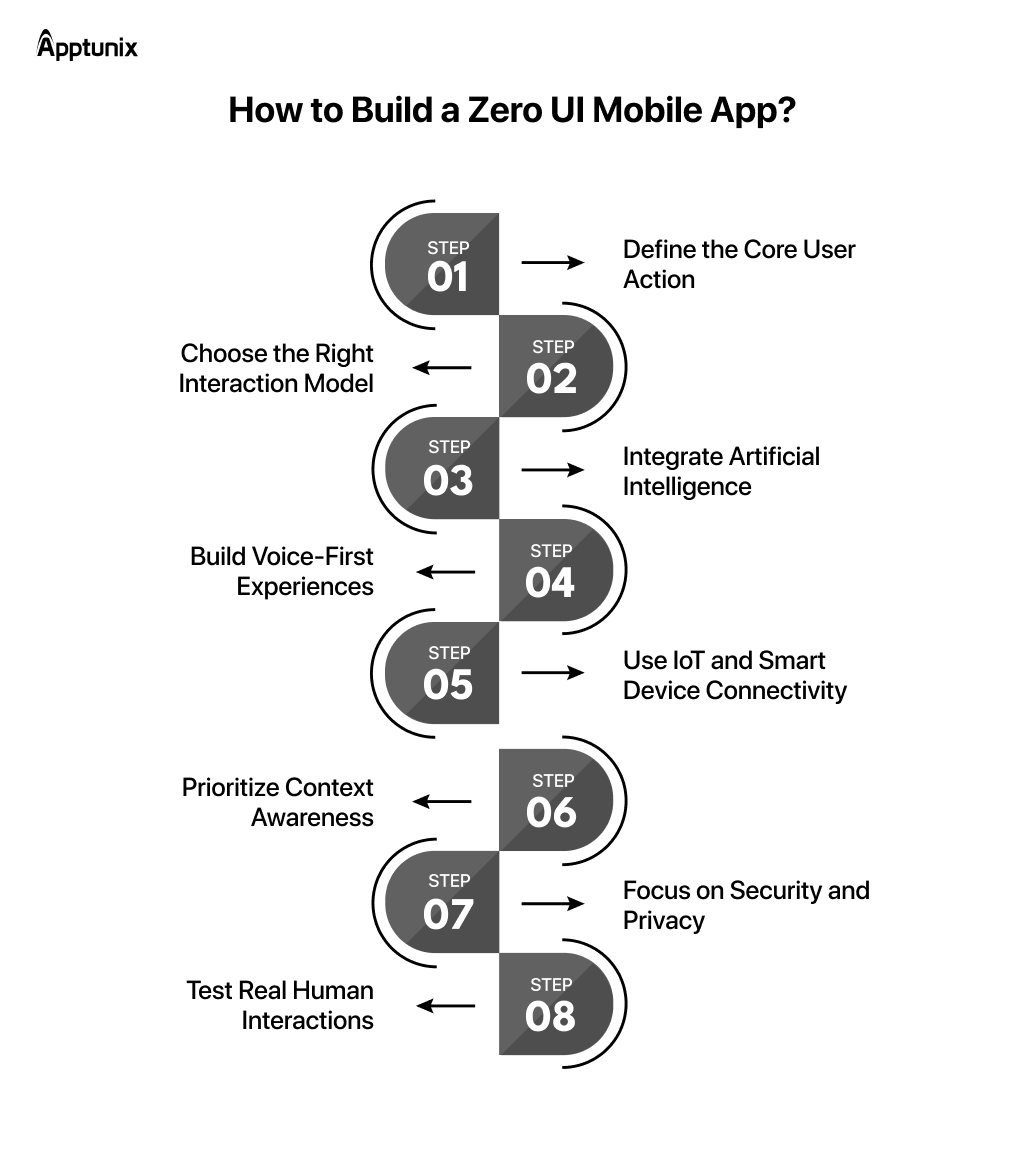
Most apps try to do too much. That’s usually the first mistake when teams try to create a Zero UI app.
It only works when the product understands the one thing the user really wants. Book the ride. Turn on the lights. Reorder groceries. Start the meeting. The clearer the action, the easier automation becomes.
Define this in one sentence: “Users want to [primary intent] without having to [secondary steps].” This becomes your North Star throughout development.
Founders force voice into products where a simple gesture or sensor would work better. That creates friction instead of removing it. The smarter companies are mixing interactions.
Zero UI doesn’t mean one-size-fits-all interaction. Different use cases demand different engagement channels.
| Interaction Model | Best For | Implementation Focus |
|---|---|---|
| Voice-First | Navigation, smart home control, accessibility-first design | NLP training, speech recognition, intent classification |
| Gesture-Based | Gaming, wearables, AR/VR experiences | Motion sensors, computer vision, gesture recognition, ML |
| Contextual | Location-based services, predictive systems, and ambient computing | Data aggregation, behavioral prediction, and real-time analytics |
| Haptic/Tactile | Notifications, safety alerts, premium wearable experiences | Haptic engine integration, vibration pattern design |
AI-powered user experience is the backbone of Zero UI development. Intent recognition, Prediction, Context understanding, and Personalization. That’s the actual product now.
The interesting thing is that AI changes retention more than acquisition here.
Implement three layers of AI intelligence:
Predictive Systems: Use historical data to anticipate needs before users articulate them.
A few years ago, most Voice-first applications felt robotic and awkward. Now users casually ask assistants to summarize emails, schedule meetings, and control devices without thinking twice.
True design for this means architecting your entire application around spoken interaction from the ground up. This requires different thinking than traditional mobile apps.
The priorities for voice-first development:
Cars, watches, TVs, earbuds, homes, appliances, and all connected products are becoming distribution channels for software experiences.
This is where Zero UI applications get powerful. When creating a Zero UI app, plan for:
| Layer | Implementation | Risk Mitigation |
|---|---|---|
| Device Discovery | mDNS, Bluetooth scanning, cloud registry | Timeout fallbacks, manual pairing options |
| Communication | MQTT, CoAP, REST APIs with retry logic | Exponential backoff, queue-based retry, offline mode |
| State Sync | Device state polling, event-driven updates | Conflict resolution, version tagging |
Context is the real interface. A truly intelligent Zero UI system understands not just what users say but also when they say it, where they are, what they’re doing, and what they’re likely to need next.
Most mobile apps still treat every notification equally. Great Zero UI systems behave more like assistants than software. They understand timing.
That’s why Invisible interface technology feels premium when done right. The product appears exactly when needed, then disappears again.
Zero UI systems collect massive behavioral data like voice patterns, device activity, location signals, and personal routines.
Especially in Voice-first applications, privacy failures destroy confidence fast because the interaction feels deeply personal.
Non-negotiable security measures for Zero UI development:
Testing Zero UI applications cannot be done through traditional QA processes. You have to watch real people use the product. And honestly, most teams discover quickly that humans behave nothing like product assumptions.
Accent variations that pass algorithmic tests might confuse real users. Conversational patterns that feel natural in scripts might miss cultural nuances.
Conduct extensive human testing with diverse demographics. Record interactions. Analyze failure modes. Test in realistic environments with real ambient noise. Build feedback loops into your application so users can easily report misunderstandings.
Zero UI apps are very different from traditional user-interface apps. Below are the key aspects that differentiate the two.
| Aspects | Zero UI App | Traditional UI App |
|---|---|---|
| Core Interaction Style | Interacts through voice, gestures, sensors, AI, biometrics, and contextual awareness instead of visible screens or buttons. | Relies on screens, menus, buttons, forms, and touch/click navigation. |
| User Experience | Feels invisible, seamless, and natural. Users communicate like talking or moving in real life. | Requires users to learn navigation flows, layouts, and interface structures. |
| AI Integration | Deeply dependent on AI, NLP, predictive systems, and machine learning for intent understanding. | AI may exist as an extra feature, but is not required for operation. |
| Speed & Convenience | Faster task execution with fewer steps and hands-free operation. | Often requires multiple taps, screens, and manual navigation steps. |
| Best Use Cases | Smart homes, wearables, automotive systems, healthcare, IoT ecosystems, voice assistants. | E-commerce apps, dashboards, social media, admin panels, and productivity tools. |
| Business Impact | Creates highly personalized and futuristic customer experiences with reduced friction. | Easier to develop, cheaper to maintain, and widely accepted across industries. |
The Zero UI apps create invisible screen interaction with the user and provide services without even looking at the screen. But how? Because a lot of technology is used behind it. Have a close look at the best of the best technology used to build a Zero UI application.
| Technology | Purpose |
|---|---|
| AI/ML | Intelligent AI automation |
| NLP | Understanding human language |
| IoT | Device communication |
| AR/VR | Gesture interactions |
| Edge Computing | Faster real-time processing |
| Cloud APIs | Scalable infrastructure |
There are different types of Zero UI apps for different industries. The cost generally depends on how complex the app is.
A simple voice-enabled Zero UI app can start from around USD $25,000, while an enterprise-level AI-powered Zero UI app can cost over USD $250,000.
Even AI voice generator apps alone can cost between USD $50,000 and $200,000 based on features and customization.
| Zero UI Complexity Level | Cost in USD | Functions |
|---|---|---|
| Simple Voice-Enabled App | $25,000-$60,000 | Basic voice commands, limited functionality |
| Mid-Level Conversational App | $60,000-$100,000+ | AI voice agent, NLP, CRM integration |
| Enterprise-Grade AI Platform | $100,000-$250,000+ | Voice cloning, high-level AI, robust backend |
| AI Voice Generator App | $50,000-$200,000+ | Example: ElevenLabs |
Zero UI isn’t a future concept anymore. It’s already running quietly inside industries where speed, convenience, and minimal friction matter more than screens. Have a look at which industry sector is already using it.
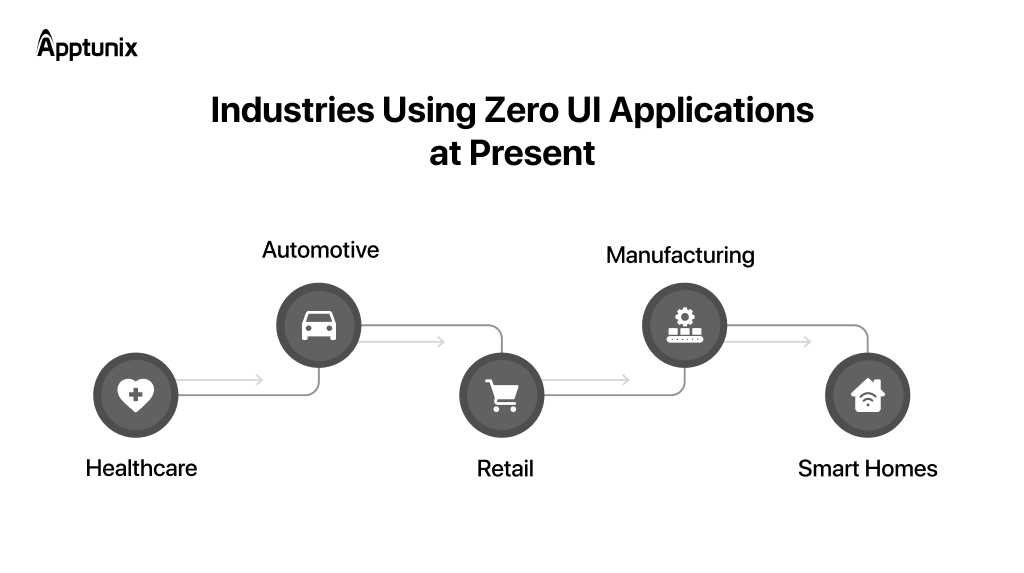
Healthcare was always overloaded with interfaces. That’s why voice-enabled patient systems are gaining traction so quickly. Doctors don’t want another dashboard. They want conversations automatically converted into records. Nurses want systems that respond while their hands are occupied. Patients want simpler interactions, especially older users.
Wearable monitoring is pushing this even further.
The interface is becoming passive. Devices track vitals continuously, surface alerts automatically, and reduce the need for manual input entirely.
Cars are becoming software platforms faster than most SaaS founders expected. And nobody wants to tap tiny buttons while driving.
That’s why hands-free navigation and AI driving assistants are becoming standard expectations instead of premium features.
Drivers now expect systems to predict routes, suggest charging stops, adjust cabin settings, and respond conversationally without touching a screen.
Retail is chasing convenience harder than almost any industry. Consumers have become impatient. Extremely impatient.
If buying something takes too many steps, conversion drops immediately. That’s why voice commerce keeps expanding despite people underestimating it for years.
Customers increasingly reorder products through assistants, speakers, and conversational flows instead of traditional browsing. Smart shopping assistants are also getting better at understanding intent instead of keywords.
That changes discovery completely.
Manufacturing is where Zero UI gets very practical very fast.
Factory environments are not built for constant screen interaction. Workers wear gloves. Machines are loud. Operations move quickly.
Hands-free operations solve real operational problems there.
Voice commands, gesture-based systems, and AI-assisted workflows allow workers to interact without stopping production tasks. Smart factory automation is making this even more efficient by connecting machines, sensors, and predictive systems.
The business impact is obvious.
Smart homes are probably the most visible version of Zero UI, but I still think we’re early. Most current systems are reactive. The next generation will feel predictive.
Automated device control is moving toward systems that learn routines instead of waiting for commands every time. Lights adjust automatically. Temperature changes based on behavior. Security systems adapt to movement patterns.
AI-powered assistants are becoming coordination layers for entire environments, not just voice bots answering questions.
That matters because consumers are slowly getting comfortable with ambient computing.
Explore four realistic case studies that highlight the business impact of Zero UI, AI-powered voice interfaces, and intelligent automation across key industries.
Client: MedSync Health Network
MedSync implemented a Zero UI healthcare solution with AI-powered clinical documentation that enabled doctors to dictate notes, update electronic health records (EHRs), and retrieve patient information hands-free. The result was faster workflows with less administrative burden.
Results (8 Months):
Client: DriveSphere Mobility
DriveSphere replaced touch-heavy controls with an AI voice assistant for connected cars. The Zero UI automotive experience enabled drivers to control navigation, climate, charging, and entertainment using natural voice commands and predictive assistance.
Results (6 Months):
Client: QuickBasket
QuickBasket introduced conversational commerce with AI-powered voice shopping to simplify repeat purchases. Customers could reorder products using voice commands while personalized recommendations improved the overall shopping experience.
Results (5 Months):
Client: PrecisionForge Industries
PrecisionForge deployed a Zero UI manufacturing platform with voice-enabled workflow automation for its smart factory operations. Workers could report issues, update production status, and access work instructions hands-free without interrupting operations.
Results (9 Months):
Below are the real-life zero-user interface application examples; explore how these apps are contributing to our daily lives.
Voice assistants looked gimmicky at first. Now they’re becoming infrastructure.
Siri and Alexa trained consumers to expect conversational interaction from devices. Not a perfect interaction. Just faster interaction. That distinction matters.
People don’t use voice because it’s magical. They use it because opening apps feels slow for simple tasks.
“Set a timer.”
“Play music.”
“Send a reminder.”
“Order groceries.”
Tiny actions compound into behavior shifts over time.
Smart homes are quietly teaching users to expect environments that react automatically. That’s a much bigger behavioral shift than most SaaS people talk about.
Take the Nest thermostat. People don’t manually adjust the temperature every hour anymore. The system learns patterns and handles it automatically.
Same with auto-dimming lights. Nobody thinks of these as “apps.” That’s the point. The interface disappears into the experience itself.
This is where AI-powered user experience becomes valuable in the real world. A good smart home automation app removes small decisions users never wanted to make in the first place.
Wearables changed something important. They normalized passive computing.
Smart watches and fitness bands continuously collect data without asking users to constantly interact with screens. That changes how products are designed entirely.
The wearable software is always running quietly in the background.
Most of the value comes from automation, not manual input.
That’s why healthcare companies, insurance providers, and fitness platforms are aggressively building around wearable ecosystems now.
Zero UI isn’t just changing interfaces—it’s quietly changing user expectations. People don’t want to navigate anymore. They want things to happen. That’s why the conversation around the best mobile app development solutions is shifting toward experiences that feel effortless, not visible. And honestly, Zero UI app development sits right at the center of that shift.
At Apptunix, we approach this a little differently:
Because in the end, this isn’t about building another app. It’s about building something people don’t even have to think about using.
If that’s the direction you’re exploring, it might be worth taking the next step.
Q 1.What is Zero UI Design?
Zero UI design is an approach where users interact with systems without relying on screens, buttons, or traditional interfaces. Instead, interactions happen through voice, gestures, sensors, AI, and context awareness.
The goal is simple: Remove friction → reduce steps → make actions feel natural.
Good Zero UI doesn’t feel like using software. It feels like things just happen.
Q 2.What is a Zero State in UI?
A Zero State in UI refers to the empty or initial state of an interface before any user data or activity exists.
For example:
In traditional UI, this state needs guidance (tips, onboarding, placeholders).
In Zero UI, this concept evolves, because instead of showing an empty screen, the system
Q 3.How do Zero UI Apps Help Emerging Businesses?
Zero UI gives emerging businesses a competitive edge early, especially when competing with larger players.
Here’s how:
Q 4.How much time does it take to create a Zero UI app?
It depends on complexity, but based on your structure:
Why does it take time:
Unlike traditional apps, a big chunk of time goes into behavior and intelligence, not just UI.
Q 5.What does it cost to make a Zero UI app?
Based on your breakdown:
Key cost drivers:
Get the weekly updates on the newest brand stories, business models and technology right in your inbox.
As the Design Lead (UI/UX) at Apptunix, Sandeep Singh brings a decade of experience in crafting human-centric digital experiences. He specializes in intuitive product design, user psychology, and aesthetic storytelling that elevates brand identity. Sandeep is dedicated to building seamless interfaces that balance form and function, ensuring every digital touchpoint is engaging and accessible. By combining design-thinking with data-driven insights, he helps businesses transform complex workflows into delightful user journeys that drive high retention and market success.
11 Views 10 min July 24, 2026

10 Views 10 min July 22, 2026
15 Views 10 min July 21, 2026
Book your consultation with us.
Book your consultation with us.


One Central, The offices 3, Level 3, DWTC, Sheikh Zayed Road, Dubai
+971 50 782 1690