Low-Code vs No-Code: Which is the Better Investment for Your Business?
19 Views 8 min October 9, 2026

Nishant Saini is a business researcher and content strategist specializing in ROI analysis for the tech, SaaS, and digital-first industries. With a knack for breaking down complex, jargon-heavy technical concepts, he transforms intricate data into clear, actionable insights that help founders, businesses, and investors make confident scaling decisions.
Nishant’s expertise spans business research, SEO, product guides, thought leadership, and brand storytelling. By blending deep technical research with a modern, conversational tone, he creates high-impact content that builds trust and drives engagement.
Core Expertise:
Tech & SaaS: Mobile apps, digital products, and AI-driven automation.
Strategic Content: Product explainers, comparison guides, and home networking/connected devices.
ROI-Focused Writing: Simplifying complex systems into user-friendly, high-conversion assets.
Thousands of teams face this choice monthly. By 2026, Notion and Coda dominate workspace consolidation. Here’s the reality: Notion offers 30,000+ templates and costs $10–20/user/month. Coda has 600+ integrations at $10–30/maker/month. But numbers don’t matter. What matters is simpler: Does your team organize work as pages or tables? Notion excels at documents and wikis. Coda dominates automation and databases. Pick based on mental model fit, not spreadsheets. The right choice feels intuitive from day one. The wrong one creates daily friction.
Sarah’s startup was drowning in tools. Slack, Asana, Google Sheets, Notion, and Zapier. Her 15-person team spent more time switching apps than building products.
By Q1 2026, she decided to consolidate to one workspace. Either Notion or Coda.
This situation plays out in thousands of organizations monthly. Founders, product managers, and operations leaders face the same question: Which all-in-one workspace actually works?
The answer depends on how your team thinks about work. Notion is document-first. Coda is database-first. Both are powerful. Both are mature. But they solve different problems.
This Notion vs Coda guide compares pricing, features, automation, AI, and enterprise requirements. So let’s dive in.
The core difference is simple: Notion is document-first. Coda is database-first.
| Choose Notion if | Choose Coda if |
|---|---|
|
|
The Golden Rule: If you need a wiki with database functionality, choose Notion. If you need a database with wiki functionality, choose Coda.
Notion prioritizes simplicity and organization, while Coda offers deeper customization, formulas, and automation for complex workflows. Have a quick look at key differences:
| Category | Winner | Why |
|---|---|---|
| Documentation | Notion | Better writing and wiki experience |
| Relational data | Coda | More powerful data logic |
| Automation | Coda | Strong workflow controls |
| AI agents | Notion | More autonomous workflows |
| Templates | Notion | Larger ecosystem |
| Integrations | Coda | More extensive pack ecosystem |
| Mobile | Notion | More polished experience |
| Viewer-heavy teams | Coda | Maker-based pricing model |
| Knowledge management | Notion | Better document-first experience |
| Internal tools | Coda | Better operational application building |
The differences run far deeper than aesthetics. Each platform emerged from a different origin story. Understanding that history helps explain why they work so differently today.
Notion’s foundation: The page is the unit of work. Databases are blocks you drag onto pages. This originated from note-taking.
Coda’s foundation: The table is the unit of work. Documents support tables. This originated from spreadsheets.
Consequence: Notion prioritizes flexibility. Coda prioritizes structure and relational data.
Notion: Infinite nesting. Pages contain subpages, which contain databases. For researchers, this is elegant. For operations teams, this creates organization clutter.
Coda: Folder-based hierarchy. Workspaces contain folders. Folders contain docs. Rigid. Predictable. Teams don’t get lost.
Notion: Lighter, faster interface. Intuitive for document work. New users get productive quickly.
Coda: Deeper customization. Complex table layouts. Steeper learning curve. More powerful for data operations.
This side-by-side Notion vs Coda comparison examines how both differ in features, flexibility, collaboration, databases, automation, and pricing.
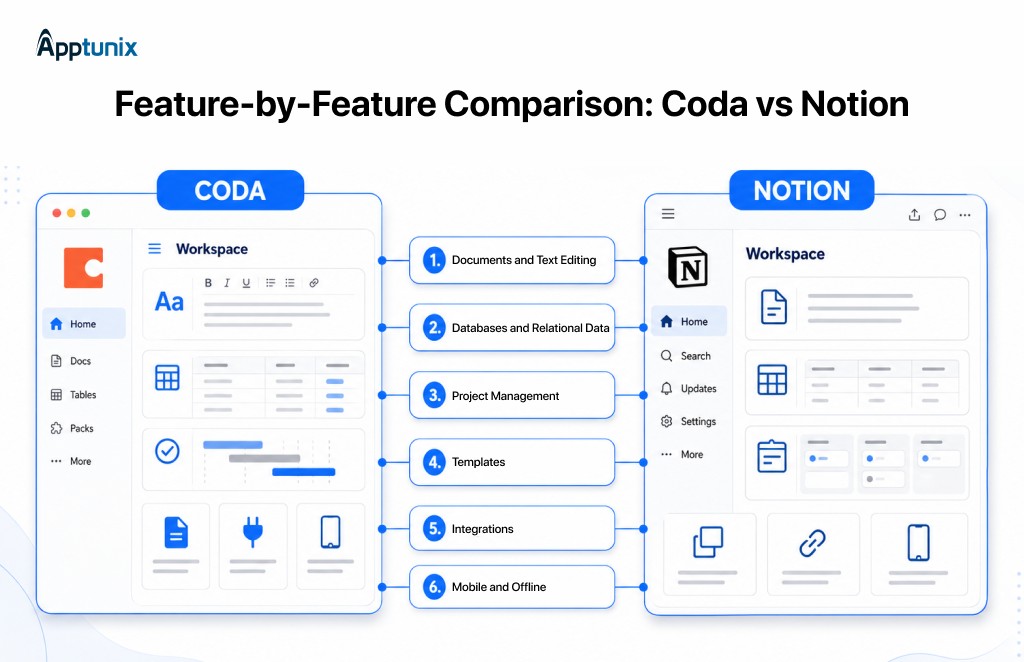
Notion wins. The block-based editor is fast. Toggle nesting goes infinitely deep. Perfect for research and documentation.
Coda is fully functional but lacks infinite toggle nesting.
Coda wins for advanced operations. Powerful relational architecture, conditional formatting, interactive buttons inside rows, and custom formulas.
Notion databases are flexible but structurally simpler. Excellent for documentation-centered databases.
Notion: Standard tracker built on databases. Multiple views (board, timeline, calendar). Lightweight tracking.
Coda: Interactive project application. Dynamic buttons trigger automations. Click “Mark Complete,” and it updates the status, notifies people, and logs to the audit trail.
Notion dominates: 30,000+ community templates for everything—CRMs, calendars, roadmaps.
Coda: Hundreds of templates. Growing but nowhere near Notion’s scale.
Notion: ~190 integrations. Mostly embed visual previews.
Coda: 600+ Packs. Programmatic bridges that pull live data or push updates natively.
Notion wins. Refined mobile app with robust offline mode. Download recent pages automatically.
Coda: Mobile app lags. No offline mode.
Let’s compare Notion and Coda’s pricing, free features, paid plans, and overall value to find the better fit.
| Feature | Notion | Coda |
|---|---|---|
| Individual use | Unlimited | Unlimited |
| Collaborators | 10 guests | Unlimited editors/viewers |
Both free plans are genuine evaluation options.
| Plan | Annual | SSO | AI |
|---|---|---|---|
| Plus | $10/user/mo | No | Limited |
| Business | $20/user/mo | Yes | Full |
| Enterprise | Custom | Yes | Full + controls |
| Explore all Notion Plans: Notion Pricing Plans | |||
| Plan | Annual | Automations | AI |
|---|---|---|---|
| Pro | $10/maker/mo | Limited | 2,000/mo |
| team | $30/maker/mo | Unlimited | 6,000/mo |
| enterprise | Custom | unlimited | 12,000/mo |
| Explore All Coda Plans: Coda Pricing Plans | |||
See how Coda and Notion support different business operations, from project management to team collaboration and workflow automation.
Notion model: Build a database with task/assignee/due date. Switch between views. Simple, lightweight.
Coda model: Build a table with interactive buttons. Click buttons to update status, assign people, and send notifications. Complex automation without Zapier.
Notion excels at combining structured database columns with rich-text documentation. Every row opens as a fully editable page. Add embedded videos, toggle summaries, and image galleries. The database becomes a knowledge management system.
Coda supports genuine relational databases. Multiple tables with complex relationships. Cross-doc syncing for live data updates. Table locking for data integrity. Interactive views that transform raw data into dashboards.
| Notion is Perfect for | Coda is Perfect for |
|---|---|
|
|
Notion released Custom Agents in February 2026. Early testers created 21,000+ agents autonomously. Give an agent a job description and triggers. It runs 24/7 without intervention.
Examples: task routing agents, status update agents, and database builders.
Button actions update records, send Slack notifications, and launch multi-step processes. Property-based, time-based, and webhook triggers. Automation visible and debuggable.
Autonomous agents execute multi-step workflows. AI search across the workspace and connected tools. Meeting transcription. Bundled into a business plan ($20/user/month).
Column-based AI. Prompt once to summarize, extract sentiment, and categorize. Drag to auto-populate the entire table. Included credits: 2,000 (Pro), 6,000 (Team), and 12,000+ (Enterprise).

This section will help to compare Notion and Coda for enterprise use, including security, administration, scalability, collaboration, integrations, and overall organizational value.
| Requirement | Notion | Coda |
|---|---|---|
| SAML SSO | Business+ | Team+ |
| SCIM provisioning | Enterprise | Enterprise |
| Audit logs | Enterprise | Enterprise |
| Advanced permissions | Business+ | Team+ |
| SOC 2 Type II | Yes | Yes |
| Viewer economics | All the same cost | Only creators pay |
Choose Notion Enterprise if: Document-centric workflows, wikis, and knowledge management are primary and the team structure is relatively flat.
Choose Coda Enterprise if: Operations-heavy with clear system builders, replacing multiple tools (Airtable, Smartsheet), extensive integrations are critical, and viewer economics matter significantly.
Determine whether Notion or Coda better suits your business by comparing features, workflows, team needs, and long-term goals.
| If You’re a | What to Choose | Reasons |
|---|---|---|
| Freelancer/Solo Founder | Choose Notion | Simple setup, templates, offline, free plan |
| Content Team | Choose Notion | Writing-focused, documentation, minimal learning |
| Operations-Heavy Organization | Choose Coda | Data-heavy workflows, automation, internal tools |
| Scaling Startup | Choose Notion | Fast adoption, templates, everyone creates equally |
| System Builders | Choose Coda | Relational databases, complex formulas, replacing Airtable |
| Viewer-Heavy (100+ people) | Choose Coda | Maker billing saves massive costs |
| Enterprise Knowledge | Depends | Document-centric: Notion. Data/automation-heavy: Coda |
Decision criteria: How do you organize information? In pages (Notion) or tables (Coda)? What percent of your team creates vs. consumes? How important is automation?
Both tools are versatile, but growing organizations can eventually outgrow off-the-shelf workspaces. Complex workflows, fragmented data, and specialized integrations may require custom operations management software built around specific business processes.
As databases grow to tens of thousands of rows or pages, they multiply infinitely, and document load times degrade. Search speeds are slow. Performance becomes frustrating.
Infinite flexibility creates infinite ways to organize things poorly. Without dedicated workspace maintenance, wikis become disorganized. Stale files multiply. Duplicate pages abound.
Even after consolidating work into Notion or Coda, critical data remains trapped elsewhere. GitHub for developers. HubSpot for sales. Zendesk for support. Neither platform can easily search across these external databases.
For businesses whose primary goal is a clean, reliable, self-maintaining corporate wiki, dedicated platforms exist. These are built specifically for knowledge management—not all-in-one workspaces.
Platforms like Slite released AI-powered agents in June 2026 that automatically clean stale documentation, identify knowledge gaps, and search across HubSpot, Slack, and GitHub without requiring full data migration.
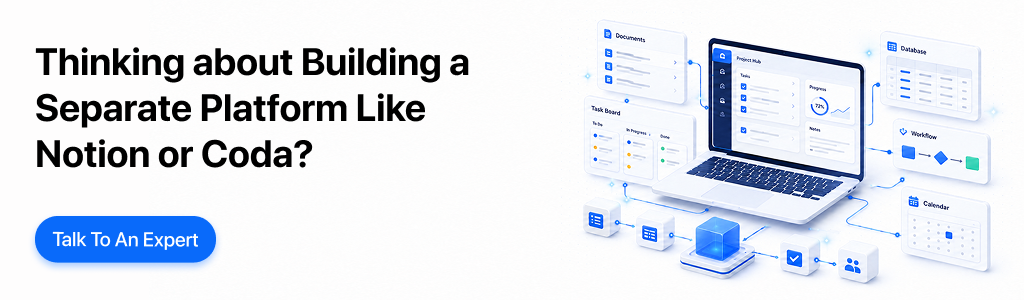
When teams hit performance limits or security constraints, product managers face a classic question: Should we build our own custom workspace or buy existing SaaS?
For most organizations, buying is more practical.
Building requires WebSockets, CRDT/OT engines, search indexers, mobile clients, and security frameworks. SaaS platforms release massive feature updates regularly. An in-house team struggles to match the pace of innovation.
If you can’t decide whether to build or buy an internal business tool, you can explore: Build vs. Buy Internal Tool: A CTO Guide
If you do decide to build, prepare for a massive engineering budget. Collaborative document-database hybrids are among the most technically demanding applications to engineer.
| Platform type | Budget | Timeline | Scope |
|---|---|---|---|
| Minimum Viable Product (MVP) | $15,000 – $70,000 | 2 – 4 months |
|
| Mid-Complexity Custom App | $70,000 – $200,000 | 4 – 6 months |
|
| Enterprise-Grade / AI-Enabled Platform | $200,000 – $500,000 | 6 – 9 months |
|
Methodology: Estimates assume professional teams, vary by scope, collaboration requirements, integrations, AI, security, and location.
Important: Full-scale competitors exceed these ranges with advanced collaboration, global infrastructure, enterprise security, and sophisticated AI.
Ongoing costs: 15–20% of the initial build annually. A $500K build costs $75K–$100K yearly.
These figures represent initial development only. Custom platforms require continuous maintenance:
If you decided to build an app like Notion or Coda, you can explore the full development process and tech stack from here.
Notion and Coda solve different problems.
Choose Notion if your organization thinks in documents, knowledge, and pages. Choose Coda if it thinks in structured data, formulas, and workflows.
For enterprise standardization, don’t pick by feature count. Pick by mental model fit. The right tool feels intuitive. The wrong tool creates daily friction.
Both platforms are mature, well-funded, and continuously improving.
And if neither platform fully fits your business, a custom solution may be the better choice. Apptunix can help you with operations management software development tailored to your workflows, integrations, and growth plans.
In 2026, the best productivity workspace is whichever one you’ll actually use consistently. Both are genuinely excellent. Pick one or build like one and ship.

Q 1.Is Coda cheaper than Notion for large teams?
For large teams, Coda is often cheaper because it charges for Doc Makers while editors can remain free. Notion generally charges per member, so costs rise faster when many people collaborate.
Q 2.Which is better for enterprise?
Enterprise choice depends on priorities. Notion is stronger for governance, security, search, and standardized documentation; Coda is stronger for operational workflows, connected databases, and custom applications. Evaluate compliance requirements and adoption complexity.
Q 3.Does Notion or Coda have better AI?
Notion currently has the broader AI experience, including agents, meeting notes, enterprise search, research, and workspace-connected actions. Coda’s AI is excellent for formulas, summaries, classification, and table-driven workflows, but narrower overall.
Q 4.Which is better for building internal tools?
Coda is better for building internal tools because its tables, formulas, buttons, forms, automations, and cross-document actions create app-like workflows. Notion can build lightweight systems, but complex operational logic usually requires workarounds.
Q 5.Can Notion replace a knowledge base?
Yes, Notion can replace a knowledge base for many teams, especially those prioritizing documentation, search, nested pages, permissions, and ease of editing. For strict governance, analytics, or support workflows, specialized platforms may remain preferable.
Q 6.Can Coda replace Airtable?
So let’s talk about the Coda vs Airtable comparison. Coda can replace Airtable when you need database-like tables embedded within documents, richer formulas, buttons, forms, and narrative context. Airtable remains stronger for dedicated relational databases, large-scale data operations, and building structured apps.
Q 7.Which has better mobile experience?
Notion generally offers a better mobile experience, with more polished apps and offline access. Coda’s mobile apps are useful for viewing and light editing, but users report more limitations, weaker offline support, and less consistency.
Q 8.Can I migrate later?
Migration is feasible but not perfectly seamless. Both support imports and exports, including common document and CSV formats; expect cleanup for formulas, permissions, automations, embeds, and database relationships. Plan before switching.
Q 9.Do I need Zapier?
Not necessarily. Coda and Notion provide native integrations, buttons, and automations for many workflows. Use Zapier when you need broader cross-app triggers, legacy systems, or complex multi-step orchestration; otherwise, it may add unnecessary cost.
Q 10.Which is better for startups?
Notion is usually better for startups: faster onboarding, easier writing, stronger templates, and a polished collaborative workspace. Choose Coda instead if your startup’s advantage depends on operational databases, complex workflows, or internal applications.
(5 ratings, average: 4.00 out of 5)
Get the weekly updates on the newest brand stories, business models and technology right in your inbox.
Nishant Saini is a business researcher and content strategist specializing in ROI analysis for the tech, SaaS, and digital-first industries. With a knack for breaking down complex, jargon-heavy technical concepts, he transforms intricate data into clear, actionable insights that help founders, businesses, and investors make confident scaling decisions.
Nishant’s expertise spans business research, SEO, product guides, thought leadership, and brand storytelling. By blending deep technical research with a modern, conversational tone, he creates high-impact content that builds trust and drives engagement.
Core Expertise:
Tech & SaaS: Mobile apps, digital products, and AI-driven automation.
Strategic Content: Product explainers, comparison guides, and home networking/connected devices.
ROI-Focused Writing: Simplifying complex systems into user-friendly, high-conversion assets.
19 Views 8 min October 9, 2026

35 Views 8 min October 8, 2026

40 Views 8 min October 6, 2026
Book your consultation with us.
Book your consultation with us.


One Central, The offices 3, Level 3, DWTC, Sheikh Zayed Road, Dubai
+971 50 782 1690